Category: Web Development

Learn web development with easy tutorials, coding tips, and guides for HTML, CSS, JavaScript, and WordPress.

  • Front-end vs. Back-end – Client-side vs. Server-side Development

    Front-end vs. Back-end – Client-side vs. Server-side Development

    In the world of web development, two terms are frequently mentioned: front-end and back-end development. These terms refer to different aspects of creating websites and applications, each with its own set of tools, responsibilities, and challenges. Understanding the difference between front-end and back-end development—and how they interact—is essential for anyone looking to dive into the tech industry.

    What is Front-end Development?

    Front-end development, often called client-side development, refers to everything that users interact with directly in their web browser. The front-end is responsible for the visual layout, design, and interactivity of a website or web application. This includes elements like buttons, forms, text, images, navigation menus, animations, and responsive design.

    Key Responsibilities of a Front-end Developer

    Front-end developers focus on creating a seamless and user-friendly experience. Some of their main tasks include:

    1. User Interface (UI) Design – Ensuring that the website is visually appealing and easy to navigate.
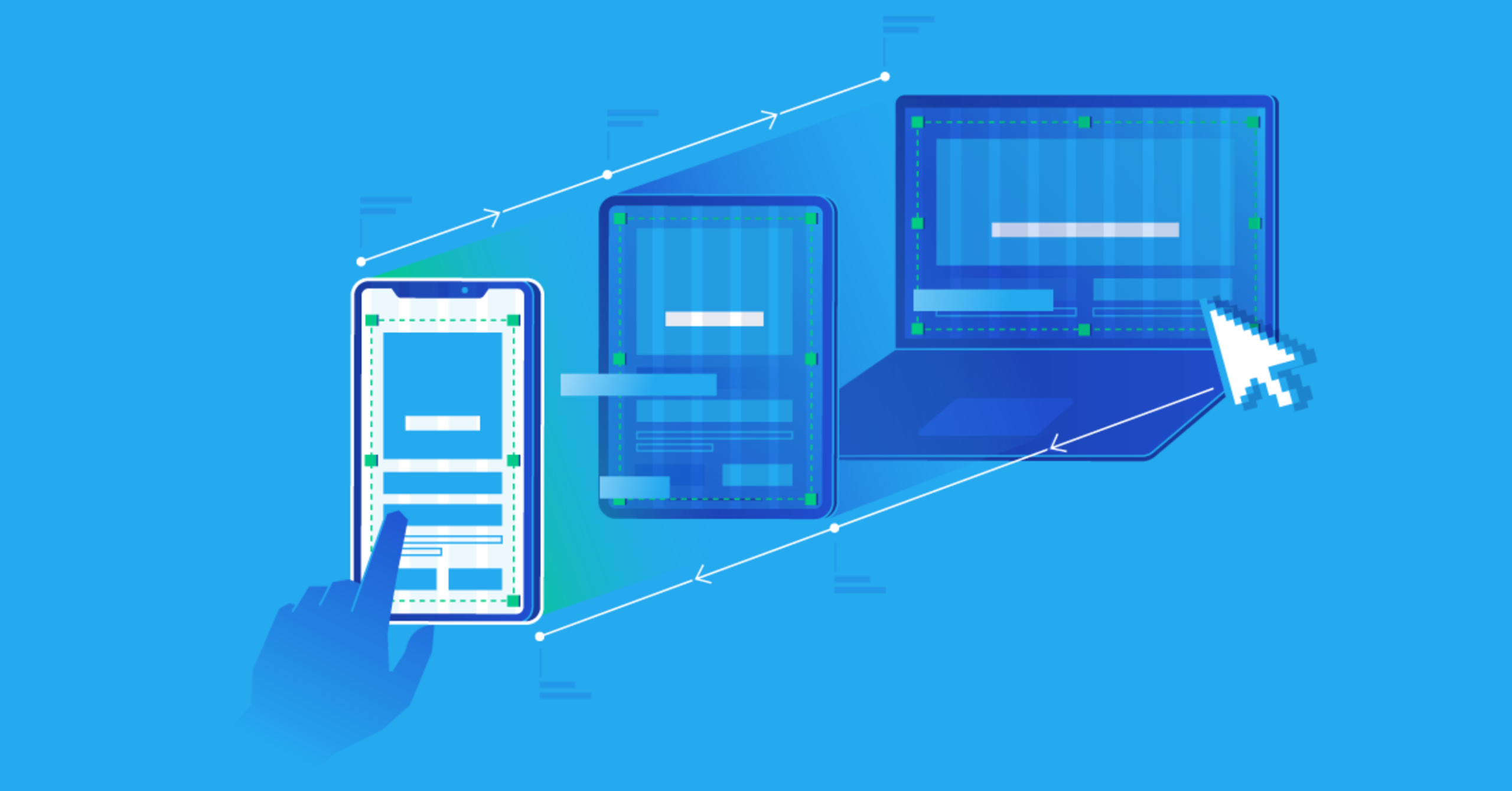
    2. Responsive Design – Making sure that the website works well on all devices, including desktops, tablets, and smartphones.
    3. Performance Optimization – Ensuring that the website loads quickly and runs smoothly.
    4. Accessibility – Making the site usable for people with disabilities, following accessibility guidelines.

    Common Front-end Technologies

    Front-end developers rely on several core technologies:

    • HTML (Hypertext Markup Language) – Provides the structure of web pages.
    • CSS (Cascading Style Sheets) – Controls the visual presentation of the web page.
    • JavaScript – Adds interactivity and dynamic behavior.

    Modern front-end development often uses frameworks and libraries such as React, Angular, and Vue.js, which simplify the creation of complex user interfaces and improve development efficiency.

    What is Back-end Development?

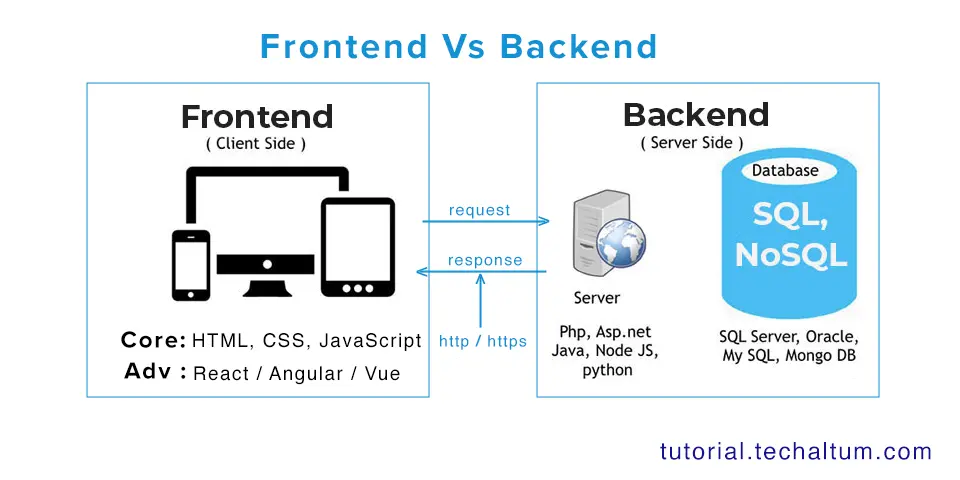
    Back-end development, also known as server-side development, involves the part of the application that users cannot see. The back-end is responsible for managing data, handling requests, and ensuring that the website functions correctly. While front-end developers create the interface, back-end developers create the underlying logic that makes it all work.

    Key Responsibilities of a Back-end Developer

    Back-end developers focus on the functionality and logic behind the scenes. Some of their responsibilities include:

    1. Database Management – Storing and retrieving data efficiently and securely.
    2. Server Logic – Handling requests from the front-end and providing the appropriate response.
    3. Authentication and Authorization – Ensuring secure access to user accounts and data.
    4. API Development – Creating interfaces that allow the front-end and other applications to interact with the back-end.

    Common Back-end Technologies

    Back-end development relies on programming languages and frameworks such as:

    • Python – Often used with frameworks like Django and Flask.
    • JavaScript (Node.js) – Allows JavaScript to be used on the server-side.
    • Java – Frequently used in enterprise applications.
    • PHP – Common in web applications and content management systems.
    • Ruby – Often used with the Ruby on Rails framework.

    Back-end developers also work with databases, such as MySQL, PostgreSQL, MongoDB, and Redis, to manage and store data efficiently.

    Client-side vs. Server-side: Understanding the Difference

    While front-end and back-end development are terms commonly used in the industry, they can also be described as client-side and server-side development.

    • Client-side (Front-end) – Everything that happens in the user’s browser is considered client-side. It’s focused on how users see and interact with a website. For example, clicking a button that changes a menu layout without refreshing the page is handled on the client-side using JavaScript.
    • Server-side (Back-end) – Everything that happens on the web server is considered server-side. This includes processing form submissions, retrieving data from databases, or sending emails. These operations are invisible to the user but are essential for a functioning website.

    How They Work Together

    Front-end and back-end development are interdependent. A well-designed front-end needs a reliable back-end to function, and an efficient back-end needs a user-friendly front-end to interact with. For example:

    • When a user fills out a form on a website, the front-end handles the display and validation of the input.
    • The back-end processes the input, stores it in a database, and returns a confirmation message.
    • The front-end displays this confirmation to the user.

    This seamless interaction is crucial for modern web applications.

    Full-stack Development: Bridging the Gap

    Some developers specialize in both front-end and back-end development, known as full-stack developers. They are capable of building an entire application from the user interface to the server logic and database management. Full-stack development is highly valued because it allows for more flexible and comprehensive solutions.

    Key Skills for Front-end Developers

    Front-end developers need both technical and design skills. Important skills include:

    • Proficiency in HTML, CSS, and JavaScript
    • Knowledge of front-end frameworks like React, Angular, or Vue.js
    • Understanding of responsive and mobile-first design
    • Familiarity with version control systems, such as Git
    • Problem-solving and debugging skills
    • Basic knowledge of UX/UI design principles

    Key Skills for Back-end Developers

    Back-end developers focus more on technical and logical skills. Important skills include:

    • Proficiency in server-side languages like Python, Java, or Node.js
    • Experience with databases (SQL and NoSQL)
    • Knowledge of RESTful APIs and web services
    • Understanding of server, network, and hosting environments
    • Security practices and authentication mechanisms
    • Debugging and optimization skills

    Emerging Trends in Web Development

    Web development is constantly evolving. Some emerging trends impacting front-end and back-end development include:

    1. Single Page Applications (SPAs) – SPAs use JavaScript to provide a smoother user experience by dynamically updating content without reloading the page.
    2. Serverless Architecture – Developers can build applications without managing servers, using cloud services to handle back-end logic.
    3. Progressive Web Apps (PWAs) – Web applications that behave like native apps on mobile devices.
    4. API-First Development – Building back-end APIs before creating the front-end to ensure smooth integration.
    5. Microservices Architecture – Breaking down the back-end into smaller, manageable services that can be developed and deployed independently.

    Conclusion

    Understanding the distinction between front-end and back-end development—or client-side and server-side development—is essential for anyone interested in web development. The front-end focuses on what users see and interact with, while the back-end ensures the application functions behind the scenes. Both sides are equally important and must work together seamlessly.

    For those considering a career in web development, it’s valuable to choose a specialization or aim to become a full-stack developer. Each path has its own set of skills, tools, and challenges, but all play a vital role in creating modern, interactive, and reliable web applications.

    Whether you are building a personal website, a complex e-commerce platform, or a dynamic web application, understanding the interplay between the front-end and back-end will help you create better user experiences and more efficient systems.

  • Responsive Design – Ensuring Websites Work on All Devices

    Responsive Design – Ensuring Websites Work on All Devices

    In today’s digital world, people access websites using a variety of devices, ranging from large desktop monitors to laptops, tablets, and smartphones. With such a diverse range of screen sizes, ensuring that a website looks great and functions well on every device is more important than ever. This is where responsive design comes into play. Responsive design is a web development approach that allows websites to automatically adapt to the size and orientation of a user’s device. By creating flexible layouts, images, and navigation systems, responsive design ensures that websites provide an optimal user experience regardless of the device being used.

    What is Responsive Design?

    Responsive design is the process of designing and developing a website so that it responds to the device’s screen size, resolution, and orientation. Unlike fixed-width designs, which are created for a single screen size, responsive design dynamically adjusts the layout of a website to fit the user’s device. This approach improves usability, accessibility, and overall satisfaction for visitors, making it a crucial aspect of modern web development.

    The concept of responsive design was popularized by Ethan Marcotte in 2010. He proposed using fluid grids, flexible images, and CSS media queries to make websites adapt to any screen size. Today, responsive design is considered the standard for creating websites that can meet the demands of an increasingly mobile audience.

    Why Responsive Design is Important

    The importance of responsive design cannot be overstated. Here are several key reasons why it is essential for modern websites:

    1. Increasing Mobile Usage

    Smartphones and tablets have become the primary way many people access the internet. According to recent studies, over half of global web traffic comes from mobile devices. Websites that are not mobile-friendly risk losing a significant portion of potential visitors. Responsive design ensures that your website can cater to this growing audience.

    2. Improved User Experience

    User experience is a critical factor in website success. A responsive website adapts its layout, font size, and navigation to provide a seamless experience on any device. Visitors can easily read content, navigate pages, and interact with forms or buttons without unnecessary zooming or scrolling. A positive user experience keeps visitors engaged and increases the likelihood of conversions, whether that means sales, subscriptions, or inquiries.

    3. Faster Page Loading

    Responsive design encourages optimized images, efficient code, and faster loading times. Websites that load quickly are favored by both users and search engines. Slow-loading sites can frustrate visitors, causing them to leave before engaging with your content. Responsive design, combined with performance optimization, ensures that your website is fast and efficient on every device.

    4. SEO Benefits

    Search engines, especially Google, prioritize mobile-friendly websites in their rankings. A responsive website eliminates the need for separate desktop and mobile versions, reducing duplicate content and improving search engine optimization (SEO). By providing a consistent experience across devices, responsive design helps search engines understand your website better, increasing the chances of higher visibility and organic traffic.

    5. Cost-Effective and Easy Maintenance

    Maintaining separate websites for desktop and mobile devices can be time-consuming and expensive. Responsive design consolidates everything into a single website, making maintenance simpler and more cost-effective. Updates, changes, or redesigns only need to be applied once, ensuring consistency across all devices and reducing long-term development costs.

    Key Elements of Responsive Design

    Responsive design is more than just adjusting a website to fit smaller screens. It involves several core elements that work together to create a flexible and adaptable website.

    1. Fluid Grid Layouts

    Fluid grids are the backbone of responsive design. Instead of using fixed pixel widths, fluid grids use relative units such as percentages. This allows the website layout to scale proportionally to the screen size. For example, a three-column layout on a desktop might adjust to a single-column layout on a smartphone while maintaining proper alignment and spacing.

    2. Flexible Images and Media

    Images and media must also be flexible to prevent distortion or overflow. By setting images to scale relative to their parent container, they can adjust to different screen sizes without losing quality. Additionally, responsive design often incorporates different image resolutions for different devices to optimize loading speed and display quality.

    3. CSS Media Queries

    CSS media queries are essential for responsive design. They allow developers to apply specific styles based on the characteristics of the device, such as screen width, height, orientation, and resolution. For instance, a media query can change the navigation menu from a horizontal layout on desktops to a collapsible hamburger menu on mobile devices. Media queries ensure that each device receives a design tailored to its display capabilities.

    4. Flexible Typography

    Text readability is crucial for user experience. Responsive design often uses relative font sizes, line heights, and spacing to ensure that content remains legible on all devices. For smaller screens, font sizes may increase slightly to improve readability, while larger screens can accommodate more text per line.

    5. Responsive Navigation

    Navigation menus must also adapt to different screen sizes. Common responsive techniques include collapsible menus, sliding panels, or dropdowns that work well on both desktop and mobile devices. Clear and accessible navigation is vital for keeping users engaged and helping them find information quickly.

    Challenges in Implementing Responsive Design

    While responsive design offers many benefits, it also presents certain challenges that developers must address.

    1. Complex Layouts

    Designing complex websites with intricate layouts can be challenging when making them responsive. Multi-column designs, interactive elements, and dynamic content require careful planning to ensure they remain functional and visually appealing across devices.

    2. Performance Optimization

    Responsive websites often need to load different images and resources depending on the device. Without proper optimization, this can lead to slower performance. Developers must implement techniques such as lazy loading, image compression, and efficient code to maintain fast loading times.

    3. Cross-Browser Compatibility

    Different browsers may interpret responsive design differently. Ensuring a consistent experience across all major browsers requires thorough testing and adjustments. This includes handling older browsers that may not fully support modern CSS features.

    4. Testing and Maintenance

    Responsive websites require extensive testing on multiple devices and screen sizes. Continuous monitoring and maintenance are necessary to address bugs, performance issues, or new device specifications. This can be time-consuming but is essential for ensuring a seamless user experience.

    Best Practices for Responsive Design

    To maximize the effectiveness of responsive design, consider the following best practices:

    1. Mobile-First Approach: Start designing for the smallest screens first and then progressively enhance the layout for larger devices. This ensures a solid foundation for mobile users, who represent the majority of web traffic.
    2. Prioritize Content: Focus on delivering the most important content first. On smaller screens, streamline menus, reduce clutter, and emphasize key messages.
    3. Flexible Media: Use responsive images and videos to ensure media adapts to various screen sizes without affecting load times.
    4. Touch-Friendly Design: Design buttons, links, and forms to be easily tappable on touch screens. Small or crowded elements can frustrate mobile users.
    5. Regular Testing: Continuously test your website on different devices, browsers, and orientations to identify issues early and maintain a consistent experience.
    6. Performance Optimization: Compress images, use efficient code, and implement caching strategies to maintain fast loading times across all devices.

    The Future of Responsive Design

    As technology evolves, responsive design will continue to play a critical role in web development. Emerging devices such as foldable phones, wearable technology, and high-resolution displays present new challenges and opportunities for responsive design. Developers will need to stay updated with design trends, CSS advancements, and best practices to ensure websites remain adaptive and user-friendly.

    Additionally, concepts like adaptive design and progressive web apps are complementing responsive design. While responsive design focuses on layout flexibility, adaptive design detects the device type and delivers a tailored version of the website. Combining these approaches can provide an even more refined user experience across an ever-expanding range of devices.

    Conclusion

    Responsive design is no longer optional; it is a necessity in today’s multi-device world. By creating websites that automatically adjust to different screen sizes and orientations, businesses can ensure a consistent, user-friendly experience for all visitors. From improving usability and SEO performance to reducing maintenance costs, the benefits of responsive design are clear.

    Implementing responsive design involves careful planning, flexible layouts, media queries, and thorough testing. Despite the challenges, the long-term rewards—satisfied users, increased engagement, and higher conversion rates—make it a worthwhile investment.

    In the end, responsive design is about more than just aesthetics; it’s about ensuring that every visitor, regardless of device, can access, interact with, and enjoy your website seamlessly. In a world where users expect websites to work flawlessly on any screen, responsive design is the key to meeting those expectations and staying ahead in the digital landscape.

  • JavaScript – Adds Interactivity and Dynamic Behavior

    JavaScript – Adds Interactivity and Dynamic Behavior

    In the modern world of web development, websites are no longer static pages of text and images. They are interactive platforms that engage users, respond to their actions, and provide dynamic experiences. At the heart of this transformation lies JavaScript, a powerful scripting language that enables developers to create interactive and dynamic behaviors on web pages. Unlike HTML and CSS, which handle structure and styling, JavaScript brings life to the web, allowing developers to go beyond static content and build responsive, engaging, and user-friendly applications.

    What is JavaScript?

    JavaScript is a high-level, interpreted programming language that is primarily used to create dynamic effects on web pages. Developed in the mid-1990s, JavaScript has evolved into one of the core technologies of web development alongside HTML and CSS. While HTML structures a page and CSS styles it, JavaScript controls behavior. This means that JavaScript allows web pages to react to user interactions, manipulate content, and even communicate with servers without the need to reload the entire page.

    JavaScript runs in the browser, making it an essential tool for client-side development. Additionally, with the rise of server-side frameworks like Node.js, JavaScript can also be used to build full-scale server applications, but its core role in web interactivity remains unrivaled.

    How JavaScript Adds Interactivity

    Interactivity refers to the capability of a website to respond to user actions. JavaScript enables this by providing tools and methods that respond to events such as clicks, mouse movements, key presses, and form submissions. For example, consider a simple form on a web page. With JavaScript, a developer can validate the user’s input in real-time, preventing errors before the form is submitted. Similarly, buttons can trigger animations, images can change on hover, and content can appear or disappear based on user choices—all thanks to JavaScript.

    Another example is interactive navigation menus. JavaScript can create dropdown menus that open when a user hovers over an item, or modals that pop up with additional information. This interactivity makes websites more user-friendly, guiding users smoothly through complex interfaces and improving overall usability.

    Dynamic Behavior with JavaScript

    Dynamic behavior in web development refers to the ability of a web page to change content, layout, or functionality in response to user actions or data. Unlike static websites, where the content remains the same unless manually updated, dynamic websites can adjust content on the fly. JavaScript is the driving force behind this dynamism.

    For instance, consider a news website. Using JavaScript, the site can fetch the latest articles from a server and display them without refreshing the page. Similarly, e-commerce platforms use JavaScript to update shopping carts in real-time, calculate totals dynamically, and provide instant feedback when items are added or removed. This seamless user experience is possible because JavaScript can manipulate the Document Object Model (DOM), which represents the structure of the web page in memory. By updating the DOM, JavaScript can change content, style, and structure on the fly, creating dynamic and responsive experiences.

    Event-Driven Programming

    One of the core concepts in JavaScript is event-driven programming. Events are actions or occurrences that happen in the browser, such as clicking a button, scrolling a page, or resizing a window. JavaScript allows developers to listen for these events and execute code in response. This approach enables interactive and dynamic behavior, as the website can react to user input in real-time.

    For example, a developer can create a photo gallery where clicking on a thumbnail displays a larger version of the image. This behavior is achieved by attaching event listeners to each thumbnail. When a user clicks, JavaScript runs a function that updates the main display area with the selected image. Event-driven programming is central to creating responsive interfaces and engaging user experiences.

    DOM Manipulation

    The Document Object Model (DOM) is a representation of a web page’s structure as a tree of elements. JavaScript interacts with the DOM to create, remove, or modify elements dynamically. This capability allows developers to change the content, attributes, and styles of web pages without needing to reload the page. For example, JavaScript can create new elements on the fly, update text content, change the appearance of elements based on user input, or even remove elements entirely.

    Consider an online quiz application. When a user answers a question, JavaScript can immediately provide feedback, highlight correct and incorrect answers, and move to the next question without reloading the page. This dynamic manipulation of the DOM is what makes web applications feel smooth, responsive, and modern.

    Animations and Effects

    Animations are another way JavaScript adds interactivity. By changing element styles over time, developers can create engaging visual effects. Animations can range from simple tasks like fading elements in and out to complex sequences such as interactive games or visual storytelling experiences. While CSS can handle basic animations, JavaScript offers greater control and flexibility, especially when animations need to respond to user input or interact with other parts of the application.

    For instance, a JavaScript-driven carousel can automatically slide through images, pause when the user hovers over it, and allow manual navigation with buttons. These effects enhance the visual appeal of a website and make user interaction more enjoyable.

    Form Validation

    Forms are essential for collecting user information, but they can be a source of frustration if handled poorly. JavaScript improves the usability of forms by validating input before submission. This prevents errors, reduces server load, and provides immediate feedback to users.

    For example, JavaScript can check if an email address is correctly formatted, if required fields are filled, or if passwords meet certain security criteria. By handling validation on the client side, users can correct mistakes instantly, improving the overall experience and reducing frustration.

    Enhancing User Experience

    Ultimately, JavaScript’s primary role is to enhance the user experience. Websites that rely solely on HTML and CSS are static and limited in functionality. JavaScript transforms these static pages into interactive environments where users can engage directly with content, navigate smoothly, and receive instant feedback. Features like live search suggestions, interactive maps, dynamic content filtering, and real-time notifications all rely on JavaScript to function effectively.

    The Role of JavaScript Frameworks and Libraries

    While raw JavaScript is powerful, frameworks and libraries like React, Angular, and Vue have made building interactive and dynamic web applications more efficient. These tools provide structured approaches to DOM manipulation, event handling, and component management, allowing developers to focus on creating rich user experiences without reinventing the wheel.

    For example, React allows developers to build user interfaces as reusable components that automatically update when data changes. This approach makes it easier to manage complex, dynamic applications while maintaining performance and usability. Regardless of the tools used, the foundation of interactivity and dynamic behavior remains JavaScript.

    JavaScript Beyond the Browser

    Although JavaScript is best known for its role in client-side development, it has expanded far beyond the browser. With technologies like Node.js, developers can build server-side applications, command-line tools, and even desktop applications using JavaScript. This universality reinforces JavaScript’s importance as a versatile programming language capable of powering both the front-end and back-end of modern web applications.

    Conclusion

    JavaScript has transformed the web from a collection of static pages into a dynamic, interactive ecosystem. By enabling interactivity, manipulating content in real-time, and responding to user events, JavaScript enhances user experiences and makes modern web applications possible. From validating forms to creating animations, interactive galleries, and live data updates, JavaScript’s role in web development is indispensable.

    In a world where users expect instant feedback, seamless navigation, and engaging experiences, JavaScript stands as the cornerstone of dynamic web behavior. Its ability to breathe life into web pages ensures that the web is not just a place to read content but a space to interact, explore, and experience.

  • CSS – Styling and Layout of Websites

    CSS – Styling and Layout of Websites

    In the world of web development, creating websites that are both functional and visually appealing requires more than just HTML. While HTML provides the structure and content of a webpage, CSS, which stands for Cascading Style Sheets, brings style, design, and layout to life. CSS allows developers to control the appearance of web elements, creating a seamless user experience and making websites aesthetically engaging. Understanding CSS is crucial for anyone involved in web design or development, as it forms the foundation for modern website presentation.

    What is CSS?

    CSS is a stylesheet language used to describe the presentation of a document written in HTML or XML. Unlike HTML, which focuses on content structure, CSS focuses on how that content looks. With CSS, developers can control various design aspects such as colors, fonts, spacing, borders, and layouts. CSS is called “cascading” because multiple styles can be applied to the same element, with specific rules determining which style takes precedence.

    CSS can be implemented in three ways:

    1. Inline CSS: Styles are written directly within an HTML element using the style attribute. For example, <p style="color: blue;">Hello World</p>.
    2. Internal CSS: Styles are defined within a <style> tag inside the HTML document’s <head> section. This method is useful for styling a single page.
    3. External CSS: Styles are written in a separate .css file and linked to the HTML document. This approach is ideal for maintaining a consistent design across multiple pages of a website.

    Using external CSS is generally considered best practice, as it keeps the HTML clean and allows for easier maintenance.

    The Importance of CSS in Web Development

    CSS plays a vital role in web development for several reasons:

    1. Visual Appeal: CSS allows designers to create visually attractive websites. It provides control over typography, colors, backgrounds, and layout elements, enabling designers to establish a brand identity and make a website appealing to users.
    2. Consistency: With CSS, styles can be applied across multiple pages of a website, ensuring a consistent look and feel. A single CSS file can control the appearance of an entire site, reducing redundancy and effort.
    3. Separation of Content and Design: CSS separates content (HTML) from presentation (CSS), making it easier to update the design without altering the content. This separation enhances maintainability and scalability.
    4. Responsive Design: CSS allows websites to adapt to different screen sizes and devices. By using techniques like media queries and flexible layouts, developers can create a responsive design that works on desktops, tablets, and mobile phones.
    5. Performance: Proper use of CSS can improve website performance. By reducing inline styles and using external stylesheets, browsers can cache CSS files, speeding up page load times.

    CSS Selectors

    CSS works by targeting HTML elements through selectors. Selectors define which elements will be styled and can range from simple to complex. Some common types of selectors include:

    • Type Selector: Targets elements by their tag name. For example, p { color: red; } will make all paragraphs red.
    • Class Selector: Targets elements by their class attribute. Classes are reusable. For example, .highlight { background-color: yellow; }.
    • ID Selector: Targets a single element with a unique ID. For example, #header { font-size: 24px; }.
    • Attribute Selector: Targets elements based on their attributes. For example, [type="text"] { border: 1px solid gray; }.
    • Pseudo-classes and Pseudo-elements: Target elements in specific states or parts of elements. For example, a:hover { color: green; } changes a link’s color when hovered.

    By combining selectors, developers can target elements with precision and apply styles efficiently.

    CSS Properties for Styling

    CSS offers a wide range of properties to style elements. These properties can be grouped into several categories:

    1. Text and Font Styling:
      • color: Sets the text color.
      • font-family: Defines the font.
      • font-size: Sets the size of the text.
      • font-weight: Controls the thickness of the text.
      • line-height: Adjusts spacing between lines.
    2. Backgrounds and Borders:
      • background-color: Sets the background color.
      • background-image: Applies an image as the background.
      • border: Adds borders with customizable width, style, and color.
      • border-radius: Creates rounded corners.
    3. Spacing:
      • margin: Controls the space outside an element.
      • padding: Controls the space inside an element.
      • gap: Defines space between items in a layout, commonly used in flexbox or grid.
    4. Box Model:
      Every element in CSS follows the box model, which consists of content, padding, border, and margin. Understanding the box model is essential for creating layouts with precise spacing and alignment.
    5. Display and Visibility:
      • display: Determines how an element is displayed (block, inline, flex, grid, none, etc.).
      • visibility: Controls whether an element is visible or hidden.
    6. Positioning:
      • position: Specifies the positioning method (static, relative, absolute, fixed, sticky).
      • top, right, bottom, left: Define offsets when using positioned elements.
      • z-index: Controls the stacking order of elements.

    CSS Layout Techniques

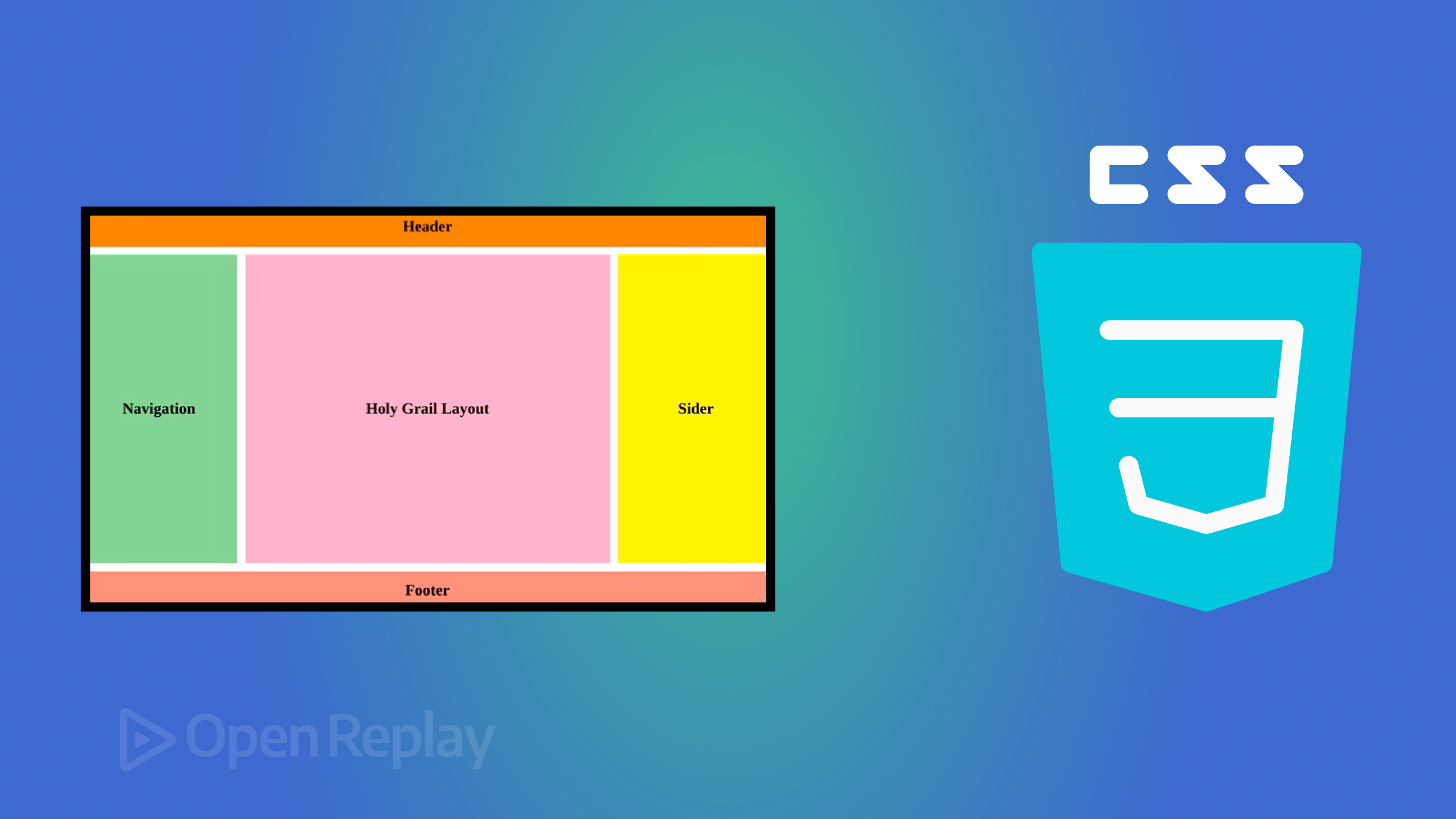
    One of the most powerful features of CSS is its ability to control layout. Proper layout ensures that content is organized, readable, and visually pleasing. Several layout techniques are commonly used:

    1. Normal Flow

    The default layout method where elements are displayed according to the HTML structure. Block elements stack vertically, and inline elements flow horizontally.

    2. Flexbox

    Flexbox is a layout model that allows elements to align and distribute space efficiently within a container. It is particularly useful for creating responsive designs. Key properties include:

    • display: flex; to activate flexbox.
    • justify-content to control horizontal alignment.
    • align-items to control vertical alignment.
    • flex-wrap to wrap items onto multiple lines.

    3. CSS Grid

    CSS Grid is a two-dimensional layout system that allows precise placement of elements in rows and columns. It is ideal for complex layouts. Key properties include:

    • display: grid; to enable grid layout.
    • grid-template-columns and grid-template-rows to define the structure.
    • gap to set spacing between grid items.
    • grid-area to position elements in specific grid cells.

    4. Positioning

    Absolute, relative, fixed, and sticky positioning give developers control over element placement on the page. These techniques are often combined with Flexbox or Grid to create dynamic layouts.

    5. Responsive Design

    Media queries allow designers to apply different styles based on screen size, resolution, or device type. For example:

    @media (max-width: 768px) {
      body {
        font-size: 14px;
      }
    }
    

    This ensures websites are accessible and functional on all devices.

    Advanced CSS Features

    CSS is continually evolving and includes advanced features that make web design more powerful:

    1. CSS Variables (Custom Properties): Allow developers to define reusable values for colors, fonts, or spacing.
    2. Animations and Transitions: Enable smooth motion effects for interactive elements.
    3. Transformations: Rotate, scale, or skew elements to create dynamic designs.
    4. Filters: Apply visual effects like blur, brightness, and contrast.
    5. Grid and Flex Enhancements: New properties provide even greater control over layout behavior.

    Best Practices in CSS

    To maximize the benefits of CSS, developers should follow best practices:

    • Keep CSS Organized: Group related styles and use comments for clarity.
    • Use External Stylesheets: Promote reusability and faster page load times.
    • Avoid Inline Styles: Keeps HTML clean and separates content from design.
    • Leverage Classes and IDs Efficiently: Use classes for reusable styles and IDs for unique elements.
    • Optimize for Performance: Minimize redundant CSS and use shorthand properties when possible.
    • Test Across Browsers: Ensure consistent appearance on all major browsers and devices.

    Conclusion

    CSS is an essential tool in modern web development. It transforms plain HTML into visually appealing and user-friendly websites, providing control over styling, layout, and responsiveness. From simple text color changes to complex grid-based designs, CSS offers immense flexibility and power. By understanding CSS fundamentals and layout techniques, developers can create websites that are not only functional but also visually compelling, consistent, and optimized for all devices. Whether building a personal blog, an e-commerce platform, or a corporate website, mastering CSS is a cornerstone of successful web development.

  • HTML – The Backbone Markup Language of Web Pages

    HTML – The Backbone Markup Language of Web Pages

    The world of the internet is vast, complex, and dynamic. Every website you visit, from simple blogs to sophisticated web applications, relies on a core set of technologies that make it possible for users to interact, browse, and consume content. Among these technologies, one stands out as the foundation of the web: HTML, or HyperText Markup Language. Often described as the backbone of web pages, HTML is the language that structures content and enables the creation of interactive, accessible, and visually appealing websites. Understanding HTML is crucial for anyone looking to venture into web development, digital design, or even content management.

    The Origins of HTML

    HTML was first developed in the early 1990s by Tim Berners-Lee, a physicist and computer scientist working at CERN. His goal was to create a universal language for sharing documents over the internet. The idea was revolutionary at the time. Instead of sending static documents via email or proprietary formats, HTML allowed the creation of hyperlinked documents that could be accessed anywhere in the world using a web browser. This marked the beginning of the World Wide Web as we know it today.

    Initially, HTML was simple. It consisted of a small set of tags that allowed users to define headings, paragraphs, links, and lists. However, as the internet grew in popularity, the language evolved, introducing new elements and attributes to accommodate more complex layouts, multimedia, and interactive content.

    Understanding HTML Structure

    HTML is a markup language, which means it is used to “mark up” text and other content with tags that tell a web browser how to display them. Unlike programming languages that perform calculations or logical operations, HTML focuses purely on structure and organization.

    A basic HTML document consists of several key components:

    1. Doctype Declaration: This is the first line in any HTML document and tells the browser which version of HTML is being used. For modern websites, this is usually <!DOCTYPE html>.
    2. HTML Element: Enclosed in <html> tags, this is the root element of the document. Everything else is nested inside it.
    3. Head Section: Defined with <head> tags, this section contains meta-information about the page, such as its title, character encoding, and references to stylesheets or scripts.
    4. Body Section: Enclosed in <body> tags, this is where all visible content resides, including text, images, videos, and interactive elements.

    Each element in HTML is typically represented by tags, which come in pairs: an opening tag <tagname> and a closing tag </tagname>. Some elements, known as self-closing tags, do not require a closing counterpart. For example, the line break element <br> inserts a new line without needing a closing tag.

    The Importance of HTML in Web Development

    HTML serves as the foundation for all web content. Without it, web browsers would have no way of understanding how to display text, images, or multimedia. Here are a few reasons why HTML is indispensable in web development:

    1. Structure and Organization: HTML defines the structure of a web page. Headings, paragraphs, lists, tables, and forms are all created using HTML tags, giving the content hierarchy and meaning.
    2. Accessibility: Proper use of HTML ensures that websites are accessible to people with disabilities. Elements like <alt> attributes for images and semantic tags like <header> and <footer> help screen readers interpret the content.
    3. Search Engine Optimization (SEO): Search engines rely on HTML to understand the content of a page. Well-structured HTML with appropriate headings, meta descriptions, and semantic elements improves a website’s visibility in search results.
    4. Integration with Other Technologies: HTML works hand in hand with CSS (Cascading Style Sheets) and JavaScript. While HTML provides the structure, CSS handles presentation and styling, and JavaScript adds interactivity.
    5. Cross-Platform Compatibility: HTML is universally supported by all web browsers and devices, ensuring that content can be accessed consistently across desktops, tablets, and smartphones.

    Key HTML Elements

    HTML offers a wide range of elements that serve different purposes. Some of the most essential elements include:

    • Headings: <h1> to <h6> tags define headings of different levels, giving content a clear hierarchy.
    • Paragraphs: <p> tags create paragraphs of text.
    • Links: <a> tags allow navigation between pages or websites.
    • Images: <img> tags display images on the page.
    • Lists: <ul> and <ol> create unordered and ordered lists, respectively.
    • Tables: <table>, <tr>, <td>, and <th> are used to organize data in tabular form.
    • Forms: <form> and its related elements allow users to submit data through input fields, checkboxes, and buttons.

    Additionally, semantic elements like <article>, <section>, <aside>, and <nav> provide meaning to different parts of a web page, making it easier for both humans and machines to understand the content.

    HTML5 – The Modern Standard

    The latest version of HTML, HTML5, has brought significant improvements and new capabilities to web development. HTML5 is not just about structure; it introduces features that make websites more interactive and multimedia-friendly. Some of the key advancements include:

    • Multimedia Support: HTML5 provides native support for audio and video through <audio> and <video> tags, eliminating the need for third-party plugins like Flash.
    • Graphics and Animation: The <canvas> element allows developers to draw graphics and animations directly within the browser.
    • Semantic Elements: New elements such as <header>, <footer>, <main>, and <figure> improve the semantic clarity of web pages.
    • Forms and Input Types: HTML5 introduces new input types, such as email, date, and range, enhancing user experience and form validation.
    • Offline and Local Storage: HTML5 enables web applications to store data locally, allowing functionality even when users are offline.

    These enhancements make HTML5 the backbone of modern web applications, enabling developers to create rich, responsive, and interactive websites without relying heavily on external tools or plugins.

    Best Practices for Writing HTML

    Writing clean, well-structured HTML is crucial for maintainability, performance, and accessibility. Some best practices include:

    1. Use Semantic Tags: Always prefer semantic elements over generic <div> tags to give meaning to your content.
    2. Keep It Organized: Proper indentation and spacing make HTML code easier to read and maintain.
    3. Validate Your Code: Use HTML validators to check for errors and ensure compliance with web standards.
    4. Separate Content and Presentation: Keep styling in CSS files and scripts in JavaScript files instead of embedding them in HTML.
    5. Optimize for Accessibility: Include descriptive alt attributes for images, use proper heading hierarchy, and ensure interactive elements are keyboard-navigable.

    The Future of HTML

    HTML continues to evolve alongside the web. While it is often taken for granted, it remains the most crucial tool for delivering content online. Emerging trends such as progressive web apps, virtual and augmented reality on the web, and increasingly sophisticated web applications all rely on HTML as the underlying structure. Its simplicity, universality, and adaptability ensure that it will remain the backbone of web development for years to come.

    Conclusion

    HTML is far more than just a collection of tags; it is the foundation upon which the internet is built. From the earliest static pages to today’s dynamic web applications, HTML has empowered developers to create structured, accessible, and interactive content. Its evolution into HTML5 has further expanded its capabilities, making it indispensable in modern web design and development. For anyone interested in web technologies, mastering HTML is the first step toward understanding the architecture of the web and contributing to the ever-growing digital landscape.

    Whether you are a beginner learning to create your first website or an experienced developer building complex applications, HTML remains at the heart of your work. Its simplicity, versatility, and universal support make it not only the backbone of web pages but also the backbone of the internet itself.