Author: admin

  • Front-end vs. Back-end – Client-side vs. Server-side Development

    Front-end vs. Back-end – Client-side vs. Server-side Development

    In the world of web development, two terms are frequently mentioned: front-end and back-end development. These terms refer to different aspects of creating websites and applications, each with its own set of tools, responsibilities, and challenges. Understanding the difference between front-end and back-end development—and how they interact—is essential for anyone looking to dive into the tech industry.

    What is Front-end Development?
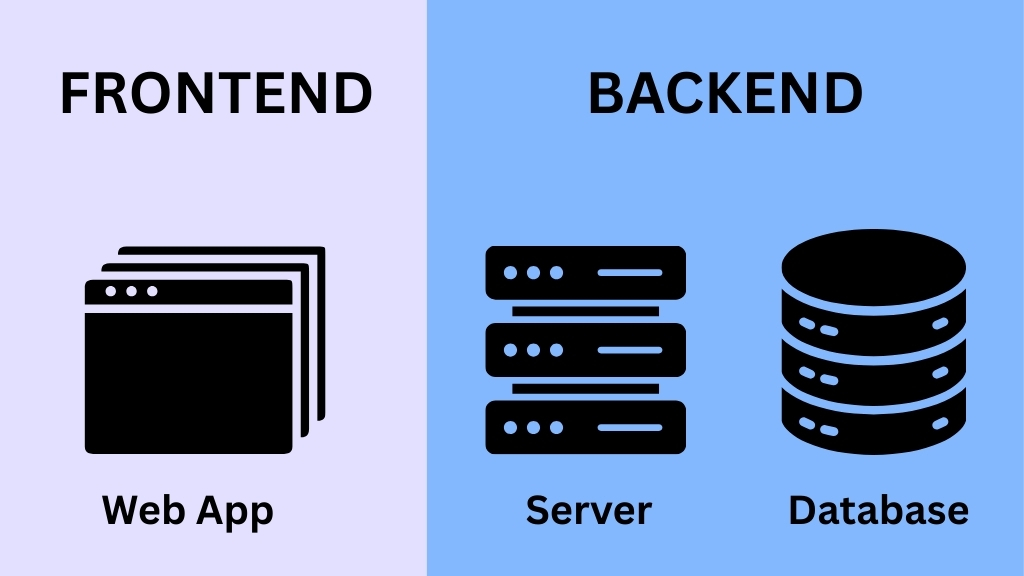
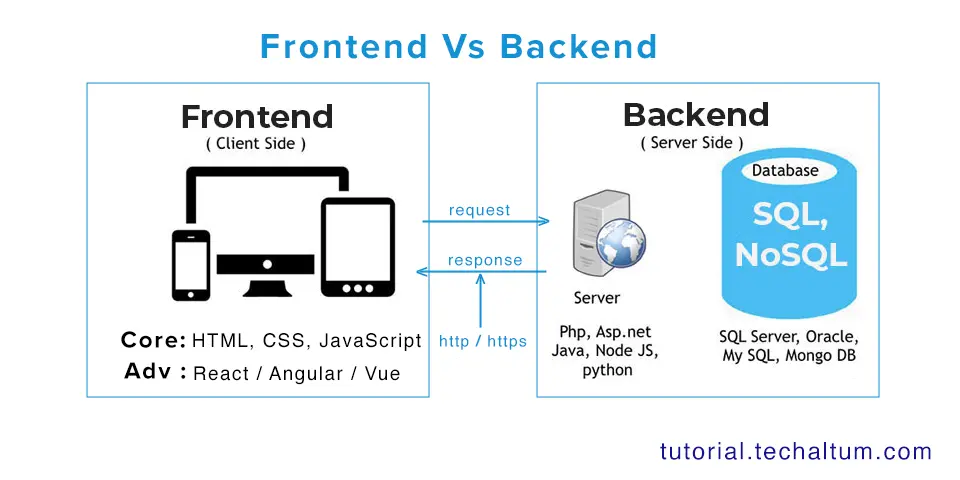
    Front-end development, often called client-side development, refers to everything that users interact with directly in their web browser. The front-end is responsible for the visual layout, design, and interactivity of a website or web application. This includes elements like buttons, forms, text, images, navigation menus, animations, and responsive design.

    Key Responsibilities of a Front-end Developer

    Front-end developers focus on creating a seamless and user-friendly experience. Some of their main tasks include:

    1. User Interface (UI) Design – Ensuring that the website is visually appealing and easy to navigate.
    2. Responsive Design – Making sure that the website works well on all devices, including desktops, tablets, and smartphones.
    3. Performance Optimization – Ensuring that the website loads quickly and runs smoothly.
    4. Accessibility – Making the site usable for people with disabilities, following accessibility guidelines.

    Common Front-end Technologies

    Front-end developers rely on several core technologies:

    • HTML (Hypertext Markup Language) – Provides the structure of web pages.
    • CSS (Cascading Style Sheets) – Controls the visual presentation of the web page.
    • JavaScript – Adds interactivity and dynamic behavior.

    Modern front-end development often uses frameworks and libraries such as React, Angular, and Vue.js, which simplify the creation of complex user interfaces and improve development efficiency.

    What is Back-end Development?
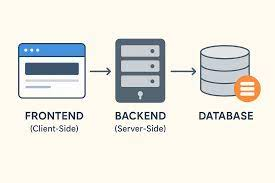
    Back-end development, also known as server-side development, involves the part of the application that users cannot see. The back-end is responsible for managing data, handling requests, and ensuring that the website functions correctly. While front-end developers create the interface, back-end developers create the underlying logic that makes it all work.

    Key Responsibilities of a Back-end Developer

    Back-end developers focus on the functionality and logic behind the scenes. Some of their responsibilities include:

    1. Database Management – Storing and retrieving data efficiently and securely.
    2. Server Logic – Handling requests from the front-end and providing the appropriate response.
    3. Authentication and Authorization – Ensuring secure access to user accounts and data.
    4. API Development – Creating interfaces that allow the front-end and other applications to interact with the back-end.

    Common Back-end Technologies

    Back-end development relies on programming languages and frameworks such as:

    • Python – Often used with frameworks like Django and Flask.
    • JavaScript (Node.js) – Allows JavaScript to be used on the server-side.
    • Java – Frequently used in enterprise applications.
    • PHP – Common in web applications and content management systems.
    • Ruby – Often used with the Ruby on Rails framework.

    Back-end developers also work with databases, such as MySQL, PostgreSQL, MongoDB, and Redis, to manage and store data efficiently.

    Client-side vs. Server-side: Understanding the Difference

    While front-end and back-end development are terms commonly used in the industry, they can also be described as client-side and server-side development.

    • Client-side (Front-end) – Everything that happens in the user’s browser is considered client-side. It’s focused on how users see and interact with a website. For example, clicking a button that changes a menu layout without refreshing the page is handled on the client-side using JavaScript.
    • Server-side (Back-end) – Everything that happens on the web server is considered server-side. This includes processing form submissions, retrieving data from databases, or sending emails. These operations are invisible to the user but are essential for a functioning website.

    How They Work Together

    Front-end and back-end development are interdependent. A well-designed front-end needs a reliable back-end to function, and an efficient back-end needs a user-friendly front-end to interact with. For example:

    • When a user fills out a form on a website, the front-end handles the display and validation of the input.
    • The back-end processes the input, stores it in a database, and returns a confirmation message.
    • The front-end displays this confirmation to the user.

    This seamless interaction is crucial for modern web applications.

    Full-stack Development: Bridging the Gap

    Some developers specialize in both front-end and back-end development, known as full-stack developers. They are capable of building an entire application from the user interface to the server logic and database management. Full-stack development is highly valued because it allows for more flexible and comprehensive solutions.

    Key Skills for Front-end Developers

    Front-end developers need both technical and design skills. Important skills include:

    • Proficiency in HTML, CSS, and JavaScript
    • Knowledge of front-end frameworks like React, Angular, or Vue.js
    • Understanding of responsive and mobile-first design
    • Familiarity with version control systems, such as Git
    • Problem-solving and debugging skills
    • Basic knowledge of UX/UI design principles

    Key Skills for Back-end Developers

    Back-end developers focus more on technical and logical skills. Important skills include:

    • Proficiency in server-side languages like Python, Java, or Node.js
    • Experience with databases (SQL and NoSQL)
    • Knowledge of RESTful APIs and web services
    • Understanding of server, network, and hosting environments
    • Security practices and authentication mechanisms
    • Debugging and optimization skills

    Emerging Trends in Web Development

    Web development is constantly evolving. Some emerging trends impacting front-end and back-end development include:

    1. Single Page Applications (SPAs) – SPAs use JavaScript to provide a smoother user experience by dynamically updating content without reloading the page.
    2. Serverless Architecture – Developers can build applications without managing servers, using cloud services to handle back-end logic.
    3. Progressive Web Apps (PWAs) – Web applications that behave like native apps on mobile devices.
    4. API-First Development – Building back-end APIs before creating the front-end to ensure smooth integration.
    5. Microservices Architecture – Breaking down the back-end into smaller, manageable services that can be developed and deployed independently.

    Conclusion

    Understanding the distinction between front-end and back-end development—or client-side and server-side development—is essential for anyone interested in web development. The front-end focuses on what users see and interact with, while the back-end ensures the application functions behind the scenes. Both sides are equally important and must work together seamlessly.

    For those considering a career in web development, it’s valuable to choose a specialization or aim to become a full-stack developer. Each path has its own set of skills, tools, and challenges, but all play a vital role in creating modern, interactive, and reliable web applications.

    Whether you are building a personal website, a complex e-commerce platform, or a dynamic web application, understanding the interplay between the front-end and back-end will help you create better user experiences and more efficient systems.

  • Responsive Design – Ensuring Websites Work on All Devices

    Responsive Design – Ensuring Websites Work on All Devices

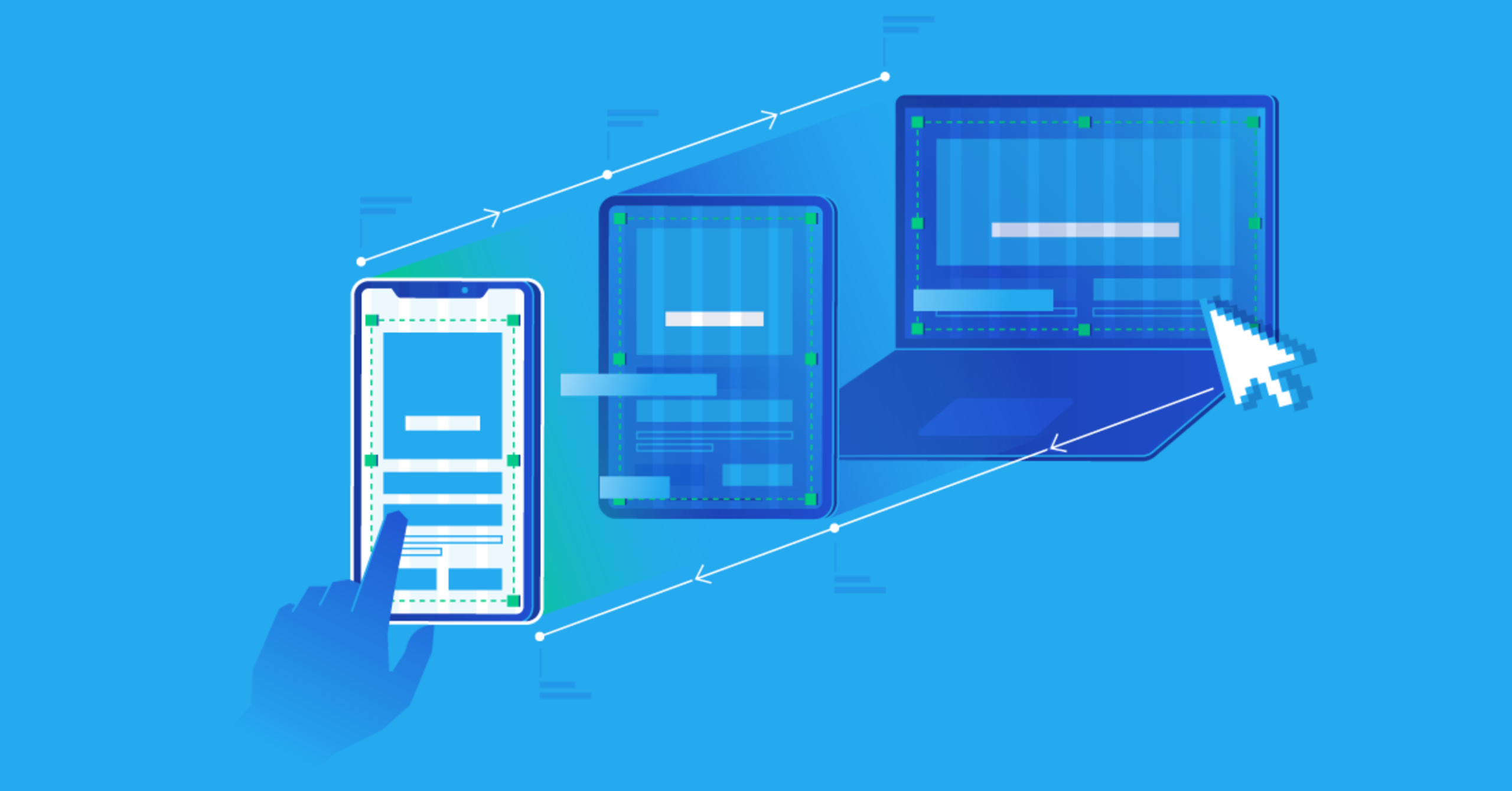
    In today’s digital world, people access websites using a variety of devices, ranging from large desktop monitors to laptops, tablets, and smartphones. With such a diverse range of screen sizes, ensuring that a website looks great and functions well on every device is more important than ever. This is where responsive design comes into play. Responsive design is a web development approach that allows websites to automatically adapt to the size and orientation of a user’s device. By creating flexible layouts, images, and navigation systems, responsive design ensures that websites provide an optimal user experience regardless of the device being used.

    What is Responsive Design?

    Responsive design is the process of designing and developing a website so that it responds to the device’s screen size, resolution, and orientation. Unlike fixed-width designs, which are created for a single screen size, responsive design dynamically adjusts the layout of a website to fit the user’s device. This approach improves usability, accessibility, and overall satisfaction for visitors, making it a crucial aspect of modern web development.

    The concept of responsive design was popularized by Ethan Marcotte in 2010. He proposed using fluid grids, flexible images, and CSS media queries to make websites adapt to any screen size. Today, responsive design is considered the standard for creating websites that can meet the demands of an increasingly mobile audience.

    Why Responsive Design is Important

    The importance of responsive design cannot be overstated. Here are several key reasons why it is essential for modern websites:

    1. Increasing Mobile Usage

    Smartphones and tablets have become the primary way many people access the internet. According to recent studies, over half of global web traffic comes from mobile devices. Websites that are not mobile-friendly risk losing a significant portion of potential visitors. Responsive design ensures that your website can cater to this growing audience.

    2. Improved User Experience

    User experience is a critical factor in website success. A responsive website adapts its layout, font size, and navigation to provide a seamless experience on any device. Visitors can easily read content, navigate pages, and interact with forms or buttons without unnecessary zooming or scrolling. A positive user experience keeps visitors engaged and increases the likelihood of conversions, whether that means sales, subscriptions, or inquiries.

    3. Faster Page Loading

    Responsive design encourages optimized images, efficient code, and faster loading times. Websites that load quickly are favored by both users and search engines. Slow-loading sites can frustrate visitors, causing them to leave before engaging with your content. Responsive design, combined with performance optimization, ensures that your website is fast and efficient on every device.

    4. SEO Benefits

    Search engines, especially Google, prioritize mobile-friendly websites in their rankings. A responsive website eliminates the need for separate desktop and mobile versions, reducing duplicate content and improving search engine optimization (SEO). By providing a consistent experience across devices, responsive design helps search engines understand your website better, increasing the chances of higher visibility and organic traffic.

    5. Cost-Effective and Easy Maintenance

    Maintaining separate websites for desktop and mobile devices can be time-consuming and expensive. Responsive design consolidates everything into a single website, making maintenance simpler and more cost-effective. Updates, changes, or redesigns only need to be applied once, ensuring consistency across all devices and reducing long-term development costs.

    Key Elements of Responsive Design

    Responsive design is more than just adjusting a website to fit smaller screens. It involves several core elements that work together to create a flexible and adaptable website.

    1. Fluid Grid Layouts

    Fluid grids are the backbone of responsive design. Instead of using fixed pixel widths, fluid grids use relative units such as percentages. This allows the website layout to scale proportionally to the screen size. For example, a three-column layout on a desktop might adjust to a single-column layout on a smartphone while maintaining proper alignment and spacing.

    2. Flexible Images and Media

    Images and media must also be flexible to prevent distortion or overflow. By setting images to scale relative to their parent container, they can adjust to different screen sizes without losing quality. Additionally, responsive design often incorporates different image resolutions for different devices to optimize loading speed and display quality.

    3. CSS Media Queries

    CSS media queries are essential for responsive design. They allow developers to apply specific styles based on the characteristics of the device, such as screen width, height, orientation, and resolution. For instance, a media query can change the navigation menu from a horizontal layout on desktops to a collapsible hamburger menu on mobile devices. Media queries ensure that each device receives a design tailored to its display capabilities.

    4. Flexible Typography

    Text readability is crucial for user experience. Responsive design often uses relative font sizes, line heights, and spacing to ensure that content remains legible on all devices. For smaller screens, font sizes may increase slightly to improve readability, while larger screens can accommodate more text per line.

    5. Responsive Navigation

    Navigation menus must also adapt to different screen sizes. Common responsive techniques include collapsible menus, sliding panels, or dropdowns that work well on both desktop and mobile devices. Clear and accessible navigation is vital for keeping users engaged and helping them find information quickly.

    Challenges in Implementing Responsive Design

    While responsive design offers many benefits, it also presents certain challenges that developers must address.

    1. Complex Layouts

    Designing complex websites with intricate layouts can be challenging when making them responsive. Multi-column designs, interactive elements, and dynamic content require careful planning to ensure they remain functional and visually appealing across devices.

    2. Performance Optimization

    Responsive websites often need to load different images and resources depending on the device. Without proper optimization, this can lead to slower performance. Developers must implement techniques such as lazy loading, image compression, and efficient code to maintain fast loading times.

    3. Cross-Browser Compatibility

    Different browsers may interpret responsive design differently. Ensuring a consistent experience across all major browsers requires thorough testing and adjustments. This includes handling older browsers that may not fully support modern CSS features.

    4. Testing and Maintenance

    Responsive websites require extensive testing on multiple devices and screen sizes. Continuous monitoring and maintenance are necessary to address bugs, performance issues, or new device specifications. This can be time-consuming but is essential for ensuring a seamless user experience.

    Best Practices for Responsive Design

    To maximize the effectiveness of responsive design, consider the following best practices:

    1. Mobile-First Approach: Start designing for the smallest screens first and then progressively enhance the layout for larger devices. This ensures a solid foundation for mobile users, who represent the majority of web traffic.
    2. Prioritize Content: Focus on delivering the most important content first. On smaller screens, streamline menus, reduce clutter, and emphasize key messages.
    3. Flexible Media: Use responsive images and videos to ensure media adapts to various screen sizes without affecting load times.
    4. Touch-Friendly Design: Design buttons, links, and forms to be easily tappable on touch screens. Small or crowded elements can frustrate mobile users.
    5. Regular Testing: Continuously test your website on different devices, browsers, and orientations to identify issues early and maintain a consistent experience.
    6. Performance Optimization: Compress images, use efficient code, and implement caching strategies to maintain fast loading times across all devices.

    The Future of Responsive Design

    As technology evolves, responsive design will continue to play a critical role in web development. Emerging devices such as foldable phones, wearable technology, and high-resolution displays present new challenges and opportunities for responsive design. Developers will need to stay updated with design trends, CSS advancements, and best practices to ensure websites remain adaptive and user-friendly.

    Additionally, concepts like adaptive design and progressive web apps are complementing responsive design. While responsive design focuses on layout flexibility, adaptive design detects the device type and delivers a tailored version of the website. Combining these approaches can provide an even more refined user experience across an ever-expanding range of devices.

    Conclusion

    Responsive design is no longer optional; it is a necessity in today’s multi-device world. By creating websites that automatically adjust to different screen sizes and orientations, businesses can ensure a consistent, user-friendly experience for all visitors. From improving usability and SEO performance to reducing maintenance costs, the benefits of responsive design are clear.

    Implementing responsive design involves careful planning, flexible layouts, media queries, and thorough testing. Despite the challenges, the long-term rewards—satisfied users, increased engagement, and higher conversion rates—make it a worthwhile investment.

    In the end, responsive design is about more than just aesthetics; it’s about ensuring that every visitor, regardless of device, can access, interact with, and enjoy your website seamlessly. In a world where users expect websites to work flawlessly on any screen, responsive design is the key to meeting those expectations and staying ahead in the digital landscape.

  • JavaScript – Adds Interactivity and Dynamic Behavior

    JavaScript – Adds Interactivity and Dynamic Behavior

    In the modern world of web development, websites are no longer static pages of text and images. They are interactive platforms that engage users, respond to their actions, and provide dynamic experiences. At the heart of this transformation lies JavaScript, a powerful scripting language that enables developers to create interactive and dynamic behaviors on web pages. Unlike HTML and CSS, which handle structure and styling, JavaScript brings life to the web, allowing developers to go beyond static content and build responsive, engaging, and user-friendly applications.

    What is JavaScript?

    JavaScript is a high-level, interpreted programming language that is primarily used to create dynamic effects on web pages. Developed in the mid-1990s, JavaScript has evolved into one of the core technologies of web development alongside HTML and CSS. While HTML structures a page and CSS styles it, JavaScript controls behavior. This means that JavaScript allows web pages to react to user interactions, manipulate content, and even communicate with servers without the need to reload the entire page.

    JavaScript runs in the browser, making it an essential tool for client-side development. Additionally, with the rise of server-side frameworks like Node.js, JavaScript can also be used to build full-scale server applications, but its core role in web interactivity remains unrivaled.

    How JavaScript Adds Interactivity

    Interactivity refers to the capability of a website to respond to user actions. JavaScript enables this by providing tools and methods that respond to events such as clicks, mouse movements, key presses, and form submissions. For example, consider a simple form on a web page. With JavaScript, a developer can validate the user’s input in real-time, preventing errors before the form is submitted. Similarly, buttons can trigger animations, images can change on hover, and content can appear or disappear based on user choices—all thanks to JavaScript.

    Another example is interactive navigation menus. JavaScript can create dropdown menus that open when a user hovers over an item, or modals that pop up with additional information. This interactivity makes websites more user-friendly, guiding users smoothly through complex interfaces and improving overall usability.

    Dynamic Behavior with JavaScript

    Dynamic behavior in web development refers to the ability of a web page to change content, layout, or functionality in response to user actions or data. Unlike static websites, where the content remains the same unless manually updated, dynamic websites can adjust content on the fly. JavaScript is the driving force behind this dynamism.

    For instance, consider a news website. Using JavaScript, the site can fetch the latest articles from a server and display them without refreshing the page. Similarly, e-commerce platforms use JavaScript to update shopping carts in real-time, calculate totals dynamically, and provide instant feedback when items are added or removed. This seamless user experience is possible because JavaScript can manipulate the Document Object Model (DOM), which represents the structure of the web page in memory. By updating the DOM, JavaScript can change content, style, and structure on the fly, creating dynamic and responsive experiences.

    Event-Driven Programming

    One of the core concepts in JavaScript is event-driven programming. Events are actions or occurrences that happen in the browser, such as clicking a button, scrolling a page, or resizing a window. JavaScript allows developers to listen for these events and execute code in response. This approach enables interactive and dynamic behavior, as the website can react to user input in real-time.

    For example, a developer can create a photo gallery where clicking on a thumbnail displays a larger version of the image. This behavior is achieved by attaching event listeners to each thumbnail. When a user clicks, JavaScript runs a function that updates the main display area with the selected image. Event-driven programming is central to creating responsive interfaces and engaging user experiences.

    DOM Manipulation

    The Document Object Model (DOM) is a representation of a web page’s structure as a tree of elements. JavaScript interacts with the DOM to create, remove, or modify elements dynamically. This capability allows developers to change the content, attributes, and styles of web pages without needing to reload the page. For example, JavaScript can create new elements on the fly, update text content, change the appearance of elements based on user input, or even remove elements entirely.

    Consider an online quiz application. When a user answers a question, JavaScript can immediately provide feedback, highlight correct and incorrect answers, and move to the next question without reloading the page. This dynamic manipulation of the DOM is what makes web applications feel smooth, responsive, and modern.

    Animations and Effects

    Animations are another way JavaScript adds interactivity. By changing element styles over time, developers can create engaging visual effects. Animations can range from simple tasks like fading elements in and out to complex sequences such as interactive games or visual storytelling experiences. While CSS can handle basic animations, JavaScript offers greater control and flexibility, especially when animations need to respond to user input or interact with other parts of the application.

    For instance, a JavaScript-driven carousel can automatically slide through images, pause when the user hovers over it, and allow manual navigation with buttons. These effects enhance the visual appeal of a website and make user interaction more enjoyable.

    Form Validation

    Forms are essential for collecting user information, but they can be a source of frustration if handled poorly. JavaScript improves the usability of forms by validating input before submission. This prevents errors, reduces server load, and provides immediate feedback to users.

    For example, JavaScript can check if an email address is correctly formatted, if required fields are filled, or if passwords meet certain security criteria. By handling validation on the client side, users can correct mistakes instantly, improving the overall experience and reducing frustration.

    Enhancing User Experience

    Ultimately, JavaScript’s primary role is to enhance the user experience. Websites that rely solely on HTML and CSS are static and limited in functionality. JavaScript transforms these static pages into interactive environments where users can engage directly with content, navigate smoothly, and receive instant feedback. Features like live search suggestions, interactive maps, dynamic content filtering, and real-time notifications all rely on JavaScript to function effectively.

    The Role of JavaScript Frameworks and Libraries

    While raw JavaScript is powerful, frameworks and libraries like React, Angular, and Vue have made building interactive and dynamic web applications more efficient. These tools provide structured approaches to DOM manipulation, event handling, and component management, allowing developers to focus on creating rich user experiences without reinventing the wheel.

    For example, React allows developers to build user interfaces as reusable components that automatically update when data changes. This approach makes it easier to manage complex, dynamic applications while maintaining performance and usability. Regardless of the tools used, the foundation of interactivity and dynamic behavior remains JavaScript.

    JavaScript Beyond the Browser

    Although JavaScript is best known for its role in client-side development, it has expanded far beyond the browser. With technologies like Node.js, developers can build server-side applications, command-line tools, and even desktop applications using JavaScript. This universality reinforces JavaScript’s importance as a versatile programming language capable of powering both the front-end and back-end of modern web applications.

    Conclusion

    JavaScript has transformed the web from a collection of static pages into a dynamic, interactive ecosystem. By enabling interactivity, manipulating content in real-time, and responding to user events, JavaScript enhances user experiences and makes modern web applications possible. From validating forms to creating animations, interactive galleries, and live data updates, JavaScript’s role in web development is indispensable.

    In a world where users expect instant feedback, seamless navigation, and engaging experiences, JavaScript stands as the cornerstone of dynamic web behavior. Its ability to breathe life into web pages ensures that the web is not just a place to read content but a space to interact, explore, and experience.

  • CSS – Styling and Layout of Websites

    CSS – Styling and Layout of Websites

    In the world of web development, creating websites that are both functional and visually appealing requires more than just HTML. While HTML provides the structure and content of a webpage, CSS, which stands for Cascading Style Sheets, brings style, design, and layout to life. CSS allows developers to control the appearance of web elements, creating a seamless user experience and making websites aesthetically engaging. Understanding CSS is crucial for anyone involved in web design or development, as it forms the foundation for modern website presentation.

    What is CSS?

    CSS is a stylesheet language used to describe the presentation of a document written in HTML or XML. Unlike HTML, which focuses on content structure, CSS focuses on how that content looks. With CSS, developers can control various design aspects such as colors, fonts, spacing, borders, and layouts. CSS is called “cascading” because multiple styles can be applied to the same element, with specific rules determining which style takes precedence.

    CSS can be implemented in three ways:

    1. Inline CSS: Styles are written directly within an HTML element using the style attribute. For example, <p style="color: blue;">Hello World</p>.
    2. Internal CSS: Styles are defined within a <style> tag inside the HTML document’s <head> section. This method is useful for styling a single page.
    3. External CSS: Styles are written in a separate .css file and linked to the HTML document. This approach is ideal for maintaining a consistent design across multiple pages of a website.

    Using external CSS is generally considered best practice, as it keeps the HTML clean and allows for easier maintenance.

    The Importance of CSS in Web Development

    CSS plays a vital role in web development for several reasons:

    1. Visual Appeal: CSS allows designers to create visually attractive websites. It provides control over typography, colors, backgrounds, and layout elements, enabling designers to establish a brand identity and make a website appealing to users.
    2. Consistency: With CSS, styles can be applied across multiple pages of a website, ensuring a consistent look and feel. A single CSS file can control the appearance of an entire site, reducing redundancy and effort.
    3. Separation of Content and Design: CSS separates content (HTML) from presentation (CSS), making it easier to update the design without altering the content. This separation enhances maintainability and scalability.
    4. Responsive Design: CSS allows websites to adapt to different screen sizes and devices. By using techniques like media queries and flexible layouts, developers can create a responsive design that works on desktops, tablets, and mobile phones.
    5. Performance: Proper use of CSS can improve website performance. By reducing inline styles and using external stylesheets, browsers can cache CSS files, speeding up page load times.

    CSS Selectors

    CSS works by targeting HTML elements through selectors. Selectors define which elements will be styled and can range from simple to complex. Some common types of selectors include:

    • Type Selector: Targets elements by their tag name. For example, p { color: red; } will make all paragraphs red.
    • Class Selector: Targets elements by their class attribute. Classes are reusable. For example, .highlight { background-color: yellow; }.
    • ID Selector: Targets a single element with a unique ID. For example, #header { font-size: 24px; }.
    • Attribute Selector: Targets elements based on their attributes. For example, [type="text"] { border: 1px solid gray; }.
    • Pseudo-classes and Pseudo-elements: Target elements in specific states or parts of elements. For example, a:hover { color: green; } changes a link’s color when hovered.

    By combining selectors, developers can target elements with precision and apply styles efficiently.

    CSS Properties for Styling

    CSS offers a wide range of properties to style elements. These properties can be grouped into several categories:

    1. Text and Font Styling:
      • color: Sets the text color.
      • font-family: Defines the font.
      • font-size: Sets the size of the text.
      • font-weight: Controls the thickness of the text.
      • line-height: Adjusts spacing between lines.
    2. Backgrounds and Borders:
      • background-color: Sets the background color.
      • background-image: Applies an image as the background.
      • border: Adds borders with customizable width, style, and color.
      • border-radius: Creates rounded corners.
    3. Spacing:
      • margin: Controls the space outside an element.
      • padding: Controls the space inside an element.
      • gap: Defines space between items in a layout, commonly used in flexbox or grid.
    4. Box Model:
      Every element in CSS follows the box model, which consists of content, padding, border, and margin. Understanding the box model is essential for creating layouts with precise spacing and alignment.
    5. Display and Visibility:
      • display: Determines how an element is displayed (block, inline, flex, grid, none, etc.).
      • visibility: Controls whether an element is visible or hidden.
    6. Positioning:
      • position: Specifies the positioning method (static, relative, absolute, fixed, sticky).
      • top, right, bottom, left: Define offsets when using positioned elements.
      • z-index: Controls the stacking order of elements.

    CSS Layout Techniques

    One of the most powerful features of CSS is its ability to control layout. Proper layout ensures that content is organized, readable, and visually pleasing. Several layout techniques are commonly used:

    1. Normal Flow

    The default layout method where elements are displayed according to the HTML structure. Block elements stack vertically, and inline elements flow horizontally.

    2. Flexbox

    Flexbox is a layout model that allows elements to align and distribute space efficiently within a container. It is particularly useful for creating responsive designs. Key properties include:

    • display: flex; to activate flexbox.
    • justify-content to control horizontal alignment.
    • align-items to control vertical alignment.
    • flex-wrap to wrap items onto multiple lines.

    3. CSS Grid

    CSS Grid is a two-dimensional layout system that allows precise placement of elements in rows and columns. It is ideal for complex layouts. Key properties include:

    • display: grid; to enable grid layout.
    • grid-template-columns and grid-template-rows to define the structure.
    • gap to set spacing between grid items.
    • grid-area to position elements in specific grid cells.

    4. Positioning

    Absolute, relative, fixed, and sticky positioning give developers control over element placement on the page. These techniques are often combined with Flexbox or Grid to create dynamic layouts.

    5. Responsive Design

    Media queries allow designers to apply different styles based on screen size, resolution, or device type. For example:

    @media (max-width: 768px) {
      body {
        font-size: 14px;
      }
    }
    

    This ensures websites are accessible and functional on all devices.

    Advanced CSS Features

    CSS is continually evolving and includes advanced features that make web design more powerful:

    1. CSS Variables (Custom Properties): Allow developers to define reusable values for colors, fonts, or spacing.
    2. Animations and Transitions: Enable smooth motion effects for interactive elements.
    3. Transformations: Rotate, scale, or skew elements to create dynamic designs.
    4. Filters: Apply visual effects like blur, brightness, and contrast.
    5. Grid and Flex Enhancements: New properties provide even greater control over layout behavior.

    Best Practices in CSS

    To maximize the benefits of CSS, developers should follow best practices:

    • Keep CSS Organized: Group related styles and use comments for clarity.
    • Use External Stylesheets: Promote reusability and faster page load times.
    • Avoid Inline Styles: Keeps HTML clean and separates content from design.
    • Leverage Classes and IDs Efficiently: Use classes for reusable styles and IDs for unique elements.
    • Optimize for Performance: Minimize redundant CSS and use shorthand properties when possible.
    • Test Across Browsers: Ensure consistent appearance on all major browsers and devices.

    Conclusion

    CSS is an essential tool in modern web development. It transforms plain HTML into visually appealing and user-friendly websites, providing control over styling, layout, and responsiveness. From simple text color changes to complex grid-based designs, CSS offers immense flexibility and power. By understanding CSS fundamentals and layout techniques, developers can create websites that are not only functional but also visually compelling, consistent, and optimized for all devices. Whether building a personal blog, an e-commerce platform, or a corporate website, mastering CSS is a cornerstone of successful web development.

  • HTML – The Backbone Markup Language of Web Pages

    HTML – The Backbone Markup Language of Web Pages

    The world of the internet is vast, complex, and dynamic. Every website you visit, from simple blogs to sophisticated web applications, relies on a core set of technologies that make it possible for users to interact, browse, and consume content. Among these technologies, one stands out as the foundation of the web: HTML, or HyperText Markup Language. Often described as the backbone of web pages, HTML is the language that structures content and enables the creation of interactive, accessible, and visually appealing websites. Understanding HTML is crucial for anyone looking to venture into web development, digital design, or even content management.

    The Origins of HTML

    HTML was first developed in the early 1990s by Tim Berners-Lee, a physicist and computer scientist working at CERN. His goal was to create a universal language for sharing documents over the internet. The idea was revolutionary at the time. Instead of sending static documents via email or proprietary formats, HTML allowed the creation of hyperlinked documents that could be accessed anywhere in the world using a web browser. This marked the beginning of the World Wide Web as we know it today.

    Initially, HTML was simple. It consisted of a small set of tags that allowed users to define headings, paragraphs, links, and lists. However, as the internet grew in popularity, the language evolved, introducing new elements and attributes to accommodate more complex layouts, multimedia, and interactive content.

    Understanding HTML Structure

    HTML is a markup language, which means it is used to “mark up” text and other content with tags that tell a web browser how to display them. Unlike programming languages that perform calculations or logical operations, HTML focuses purely on structure and organization.

    A basic HTML document consists of several key components:

    1. Doctype Declaration: This is the first line in any HTML document and tells the browser which version of HTML is being used. For modern websites, this is usually <!DOCTYPE html>.
    2. HTML Element: Enclosed in <html> tags, this is the root element of the document. Everything else is nested inside it.
    3. Head Section: Defined with <head> tags, this section contains meta-information about the page, such as its title, character encoding, and references to stylesheets or scripts.
    4. Body Section: Enclosed in <body> tags, this is where all visible content resides, including text, images, videos, and interactive elements.

    Each element in HTML is typically represented by tags, which come in pairs: an opening tag <tagname> and a closing tag </tagname>. Some elements, known as self-closing tags, do not require a closing counterpart. For example, the line break element <br> inserts a new line without needing a closing tag.

    The Importance of HTML in Web Development

    HTML serves as the foundation for all web content. Without it, web browsers would have no way of understanding how to display text, images, or multimedia. Here are a few reasons why HTML is indispensable in web development:

    1. Structure and Organization: HTML defines the structure of a web page. Headings, paragraphs, lists, tables, and forms are all created using HTML tags, giving the content hierarchy and meaning.
    2. Accessibility: Proper use of HTML ensures that websites are accessible to people with disabilities. Elements like <alt> attributes for images and semantic tags like <header> and <footer> help screen readers interpret the content.
    3. Search Engine Optimization (SEO): Search engines rely on HTML to understand the content of a page. Well-structured HTML with appropriate headings, meta descriptions, and semantic elements improves a website’s visibility in search results.
    4. Integration with Other Technologies: HTML works hand in hand with CSS (Cascading Style Sheets) and JavaScript. While HTML provides the structure, CSS handles presentation and styling, and JavaScript adds interactivity.
    5. Cross-Platform Compatibility: HTML is universally supported by all web browsers and devices, ensuring that content can be accessed consistently across desktops, tablets, and smartphones.

    Key HTML Elements

    HTML offers a wide range of elements that serve different purposes. Some of the most essential elements include:

    • Headings: <h1> to <h6> tags define headings of different levels, giving content a clear hierarchy.
    • Paragraphs: <p> tags create paragraphs of text.
    • Links: <a> tags allow navigation between pages or websites.
    • Images: <img> tags display images on the page.
    • Lists: <ul> and <ol> create unordered and ordered lists, respectively.
    • Tables: <table>, <tr>, <td>, and <th> are used to organize data in tabular form.
    • Forms: <form> and its related elements allow users to submit data through input fields, checkboxes, and buttons.

    Additionally, semantic elements like <article>, <section>, <aside>, and <nav> provide meaning to different parts of a web page, making it easier for both humans and machines to understand the content.

    HTML5 – The Modern Standard

    The latest version of HTML, HTML5, has brought significant improvements and new capabilities to web development. HTML5 is not just about structure; it introduces features that make websites more interactive and multimedia-friendly. Some of the key advancements include:

    • Multimedia Support: HTML5 provides native support for audio and video through <audio> and <video> tags, eliminating the need for third-party plugins like Flash.
    • Graphics and Animation: The <canvas> element allows developers to draw graphics and animations directly within the browser.
    • Semantic Elements: New elements such as <header>, <footer>, <main>, and <figure> improve the semantic clarity of web pages.
    • Forms and Input Types: HTML5 introduces new input types, such as email, date, and range, enhancing user experience and form validation.
    • Offline and Local Storage: HTML5 enables web applications to store data locally, allowing functionality even when users are offline.

    These enhancements make HTML5 the backbone of modern web applications, enabling developers to create rich, responsive, and interactive websites without relying heavily on external tools or plugins.

    Best Practices for Writing HTML

    Writing clean, well-structured HTML is crucial for maintainability, performance, and accessibility. Some best practices include:

    1. Use Semantic Tags: Always prefer semantic elements over generic <div> tags to give meaning to your content.
    2. Keep It Organized: Proper indentation and spacing make HTML code easier to read and maintain.
    3. Validate Your Code: Use HTML validators to check for errors and ensure compliance with web standards.
    4. Separate Content and Presentation: Keep styling in CSS files and scripts in JavaScript files instead of embedding them in HTML.
    5. Optimize for Accessibility: Include descriptive alt attributes for images, use proper heading hierarchy, and ensure interactive elements are keyboard-navigable.

    The Future of HTML

    HTML continues to evolve alongside the web. While it is often taken for granted, it remains the most crucial tool for delivering content online. Emerging trends such as progressive web apps, virtual and augmented reality on the web, and increasingly sophisticated web applications all rely on HTML as the underlying structure. Its simplicity, universality, and adaptability ensure that it will remain the backbone of web development for years to come.

    Conclusion

    HTML is far more than just a collection of tags; it is the foundation upon which the internet is built. From the earliest static pages to today’s dynamic web applications, HTML has empowered developers to create structured, accessible, and interactive content. Its evolution into HTML5 has further expanded its capabilities, making it indispensable in modern web design and development. For anyone interested in web technologies, mastering HTML is the first step toward understanding the architecture of the web and contributing to the ever-growing digital landscape.

    Whether you are a beginner learning to create your first website or an experienced developer building complex applications, HTML remains at the heart of your work. Its simplicity, versatility, and universal support make it not only the backbone of web pages but also the backbone of the internet itself.

  • Tech Innovations – Shaping the Future of Our World

    Tech Innovations – Shaping the Future of Our World

    Technology is evolving at an unprecedented pace, transforming every aspect of our lives. From the way we communicate to the way we work, learn, and even entertain ourselves, tech innovations continue to redefine the boundaries of what is possible. The rapid advancement of technology has created a dynamic environment where innovation is not just encouraged but essential for survival in today’s fast-paced world.

    The Role of Technology in Modern Society

    Tech innovations have become the backbone of modern society. They have influenced industries such as healthcare, education, transportation, and entertainment, creating more efficient, cost-effective, and innovative solutions. For instance, artificial intelligence and machine learning algorithms are now used to analyze complex data, predict trends, and provide solutions that were once considered impossible. Similarly, automation has revolutionized manufacturing processes, reducing human error and increasing productivity.

    In addition to industrial and business applications, technology has dramatically improved personal lives. Smartphones, smart homes, and wearable devices have changed the way we interact with our surroundings. People can monitor their health in real-time, communicate instantly across continents, and access information within seconds. This level of connectivity and convenience would have been unimaginable a few decades ago.

    Key Areas of Tech Innovation

    Several areas of technology have experienced significant breakthroughs in recent years. These innovations are not just incremental improvements but transformative changes that have the potential to redefine industries and reshape society.

    1. Artificial Intelligence and Machine Learning

    Artificial intelligence (AI) is at the forefront of tech innovation. AI systems can perform tasks that typically require human intelligence, such as problem-solving, decision-making, and learning from experience. Machine learning, a subset of AI, allows computers to improve their performance over time without explicit programming. From virtual assistants and chatbots to predictive analytics and autonomous vehicles, AI has proven to be a game-changer across multiple sectors.

    In healthcare, AI is used to analyze medical images, predict patient outcomes, and even assist in surgery. In finance, algorithms analyze massive amounts of data to detect fraud, manage risks, and optimize investments. AI’s versatility and adaptability make it one of the most powerful tools in modern technology.

    2. Internet of Things (IoT)

    The Internet of Things (IoT) refers to a network of interconnected devices that communicate and share data with each other. Smart homes, wearable fitness trackers, and connected cars are all examples of IoT applications. By enabling devices to exchange information seamlessly, IoT improves efficiency, convenience, and safety.

    In industrial settings, IoT devices monitor equipment performance, detect potential failures, and optimize production processes. In urban planning, smart cities use IoT technology to manage traffic, reduce energy consumption, and improve public services. The integration of IoT into daily life has made technology more intuitive and responsive to human needs.

    3. Renewable Energy Technologies

    As the world grapples with climate change, tech innovations in renewable energy have become crucial. Solar panels, wind turbines, and energy storage systems are becoming more efficient and affordable, making sustainable energy solutions more accessible. Advances in battery technology, for instance, have improved the storage and distribution of energy, enabling the adoption of electric vehicles and renewable power grids.

    Moreover, smart grids powered by advanced sensors and analytics can optimize energy consumption and reduce waste. By combining renewable energy sources with innovative technologies, we can move towards a cleaner, more sustainable future.

    4. Biotechnology and Healthcare Innovations

    Biotechnology is transforming healthcare through innovations in gene editing, personalized medicine, and diagnostic tools. Techniques like CRISPR have opened up new possibilities for treating genetic disorders and developing targeted therapies. Personalized medicine uses a patient’s genetic information to design customized treatments, increasing effectiveness and minimizing side effects.

    Telemedicine and digital health platforms have also revolutionized healthcare delivery, providing remote access to medical professionals and reducing the need for in-person visits. These innovations not only improve patient outcomes but also make healthcare more accessible and affordable.

    5. Robotics and Automation

    Robotics and automation have significantly altered manufacturing, logistics, and service industries. Robots can perform repetitive, dangerous, or complex tasks with precision and consistency, reducing human error and increasing productivity. In warehouses, autonomous robots streamline inventory management and order fulfillment. In healthcare, robotic surgery allows for minimally invasive procedures with faster recovery times.

    Automation is not limited to physical tasks. Software automation and robotic process automation (RPA) streamline business operations by handling routine, time-consuming tasks such as data entry, invoice processing, and customer support. As robots become more intelligent and adaptable, their potential applications continue to expand.

    6. Virtual and Augmented Reality

    Virtual reality (VR) and augmented reality (AR) technologies are reshaping entertainment, education, and professional training. VR immerses users in a fully digital environment, while AR overlays digital information onto the real world. These technologies provide new ways to learn, explore, and interact with content.

    In education, VR simulations allow students to experience complex scenarios, such as historical events or scientific experiments, in a safe and engaging environment. In industries like architecture and construction, AR assists in visualizing projects and improving design accuracy. Gaming and entertainment continue to benefit from immersive experiences that engage users on a whole new level.

    The Future of Tech Innovations

    The pace of technological innovation shows no signs of slowing down. Emerging fields such as quantum computing, nanotechnology, and space exploration promise to bring even more radical changes to our lives. Quantum computers, for instance, have the potential to solve problems that are currently impossible for classical computers, revolutionizing fields like cryptography, material science, and drug discovery.

    Moreover, the ethical and societal implications of technology are becoming increasingly important. As AI, biotechnology, and automation evolve, it is crucial to ensure that innovations benefit humanity as a whole. Responsible innovation, data privacy, and cybersecurity are key considerations for shaping a future where technology serves society positively.

    Challenges and Considerations

    While tech innovations offer tremendous opportunities, they also present significant challenges. Rapid technological change can disrupt industries, leading to job displacement and social inequality. Ethical concerns surrounding AI, data privacy, and genetic engineering require careful regulation and oversight.

    Additionally, the environmental impact of technology cannot be ignored. Electronic waste, energy consumption, and resource extraction pose sustainability challenges. Tech innovators must balance progress with responsibility, ensuring that advancements contribute to a better, more equitable world.

    Conclusion

    Tech innovations are more than just new gadgets or software—they are transformative forces shaping the way we live, work, and interact. From AI and IoT to renewable energy, robotics, and biotechnology, technological advancements continue to redefine human potential. As we move forward, embracing these innovations responsibly and ethically will be essential for creating a sustainable, connected, and prosperous future.

    The journey of technological innovation is ongoing, and its possibilities are limitless. By understanding and leveraging these advancements, individuals, businesses, and societies can unlock new opportunities, solve complex challenges, and create a world that is smarter, safer, and more efficient.

  • Understanding Software Updates – Importance, Types, and Best Practices

    In today’s digital era, software is the backbone of nearly every device we use, from computers and smartphones to smart home systems and automobiles. To ensure that software runs efficiently, securely, and smoothly, developers release software updates regularly. These updates are not just minor tweaks; they play a critical role in enhancing functionality, fixing issues, and protecting devices from vulnerabilities. Understanding software updates, their types, and best practices for managing them is essential for both individual users and businesses.

    What Are Software Updates?

    Software updates are modifications or enhancements made to existing programs or applications. These updates can range from simple bug fixes to major feature additions. Developers release them to improve the software’s performance, fix security flaws, address compatibility issues, and sometimes even redesign the user interface.

    Software updates are typically delivered through internet downloads, automated system prompts, or manual installations. Depending on the system and software, updates can be mandatory or optional, and they often include release notes detailing the changes.

    Importance of Software Updates

    1. Security Protection
      One of the most critical reasons to update software is security. Cybercriminals constantly search for vulnerabilities in software to exploit them for malicious purposes. Software updates often patch these vulnerabilities, preventing potential attacks such as data breaches, ransomware, or malware infections. Delaying updates can leave systems exposed to known threats, putting sensitive information at risk.
    2. Bug Fixes
      No software is perfect, and even after rigorous testing, issues can arise. Software updates address these problems by fixing bugs, errors, and glitches that may cause programs to crash or function improperly. By keeping software updated, users can enjoy smoother operation and fewer interruptions.
    3. Improved Performance
      Updates often include optimizations that enhance the software’s speed and efficiency. This can include better memory management, faster loading times, and reduced system resource consumption. Over time, these improvements can significantly enhance user experience.
    4. New Features and Functionality
      Developers frequently introduce new features in software updates. These additions can improve usability, add tools, or expand functionality. For instance, a messaging app might add new emojis, security features, or improved video-calling options through an update.
    5. Compatibility
      Technology evolves rapidly, and software must adapt to remain compatible with new hardware, operating systems, or other applications. Updates ensure that software continues to work seamlessly across different devices and platforms.

    Types of Software Updates

    Software updates can be categorized into several types based on their purpose and scale. Understanding these types helps users prioritize and manage updates more effectively.

    1. Patch Updates
      Patch updates are small, targeted updates designed to fix specific bugs or security vulnerabilities. They are usually minor in size and released frequently to address critical issues quickly. Patches are essential for maintaining system security and stability.
    2. Minor Updates
      Minor updates include small improvements, bug fixes, and minor feature enhancements. They are often released periodically and may also include performance optimizations. Users typically notice minor updates through version number increments, such as from 1.0.2 to 1.0.3.
    3. Major Updates
      Major updates introduce significant changes, including new features, interface redesigns, and substantial improvements to functionality. These updates are less frequent but usually require more time and resources to install. Major updates often change the software version significantly, such as from 1.0 to 2.0.
    4. Security Updates
      These updates focus specifically on addressing security vulnerabilities that could be exploited by attackers. Security updates are critical and should be installed as soon as they are available to prevent potential cyber threats.
    5. Driver Updates
      Hardware devices such as graphics cards, printers, and network adapters require drivers to function correctly. Driver updates improve compatibility, performance, and stability of these devices, often enhancing overall system performance.

    How Software Updates Are Delivered

    Software updates can be delivered through various methods depending on the software and device:

    1. Automatic Updates
      Many modern systems and applications offer automatic updates. When enabled, these updates download and install in the background without requiring user intervention. This ensures that software remains up-to-date and secure with minimal effort.
    2. Manual Updates
      Some software requires manual installation of updates. Users may need to download the update file from the developer’s website or initiate the process from the software interface. Manual updates provide more control but require users to monitor update availability actively.
    3. Incremental Updates
      Incremental updates involve updating only the parts of the software that have changed rather than reinstalling the entire program. This reduces download size and installation time.
    4. Over-the-Air Updates (OTA)
      Common in mobile devices and IoT systems, OTA updates allow software to be updated wirelessly. Devices automatically download updates from the internet and install them without connecting to a computer.

    Best Practices for Managing Software Updates

    1. Enable Automatic Updates
      Whenever possible, enable automatic updates to ensure software remains current and secure. Automatic updates reduce the risk of missing critical patches or improvements.
    2. Regularly Check for Updates
      Even with automatic updates enabled, it’s good practice to check for updates manually occasionally. Some updates may require manual intervention or may not be pushed automatically to all users.
    3. Backup Important Data
      Before installing major updates, especially operating system updates, back up important data. Although updates are generally safe, unexpected issues can sometimes occur, leading to data loss.
    4. Read Update Notes
      Update notes provide valuable information about changes, bug fixes, and new features. Reviewing them helps users understand the purpose of the update and any actions they may need to take.
    5. Maintain Compatible Hardware
      Ensure that your hardware meets the system requirements for new updates. Installing updates on incompatible devices may cause performance issues or software crashes.
    6. Avoid Delaying Security Updates
      Security updates are the most critical. Delaying them can expose systems to cyberattacks. Prioritize installing security patches as soon as they are released.

    Challenges and Risks of Software Updates

    While software updates are crucial, they can sometimes introduce challenges:

    1. Compatibility Issues
      New updates may conflict with existing hardware, drivers, or other software, causing errors or instability.
    2. Software Bugs
      Occasionally, updates themselves may contain bugs that were not detected during testing. These issues can temporarily disrupt functionality.
    3. Data Loss Risk
      Rarely, updates may fail during installation, potentially leading to data loss or corruption. Regular backups help mitigate this risk.
    4. Time and Resource Consumption
      Some updates, especially major ones, may take significant time to download and install. They can also consume substantial system resources, temporarily slowing down devices.

    The Future of Software Updates

    As technology continues to advance, software updates are becoming more intelligent and user-friendly. AI-driven update systems can predict potential issues, optimize installation times, and customize updates for specific user needs. Additionally, cloud-based and modular software designs allow for smaller, more efficient updates that reduce system downtime and bandwidth usage.

    The focus is shifting toward continuous updates and seamless user experiences. With the rise of smart devices, wearable technology, and connected systems, keeping software up-to-date will remain a critical aspect of cybersecurity, performance, and innovation.

    Conclusion

    Software updates are more than just routine notifications—they are essential tools for maintaining security, performance, and functionality. By understanding the different types of updates, their importance, and best practices for managing them, users can ensure that their devices remain safe, efficient, and compatible with the latest technology. Ignoring updates may seem convenient in the short term, but staying current with software is an investment in security, productivity, and longevity of digital systems.

    Staying informed and proactive about software updates ensures that users and businesses alike can fully benefit from the capabilities of modern software while minimizing risks and maximizing efficiency.

  • Cybersecurity – Protecting the Digital World

    Cybersecurity – Protecting the Digital World

    In today’s digital era, cybersecurity has become one of the most critical aspects of both personal and organizational safety. With the rapid growth of technology, more aspects of our lives are connected to the internet than ever before. From online banking and shopping to communication and healthcare, digital systems hold vast amounts of sensitive information. Protecting this data from unauthorized access, theft, and damage is the primary goal of cybersecurity.

    Understanding Cybersecurity

    Cybersecurity refers to the practice of defending computers, servers, mobile devices, electronic systems, networks, and data from malicious attacks. It encompasses various strategies, technologies, and processes designed to protect digital infrastructure. Cybersecurity is not limited to just protecting computers; it also involves securing networks, software, and even the data that flows through these systems.

    There are several key components of cybersecurity:

    1. Network Security: This involves protecting networks from intruders, whether they are targeted attacks or opportunistic malware. Tools like firewalls, intrusion detection systems, and secure routers are essential in maintaining network integrity.
    2. Information Security: Information security focuses on protecting the confidentiality, integrity, and availability of data. This includes encryption, secure storage, and strict access controls to ensure that sensitive data remains safe.
    3. Application Security: Every application we use, from web browsers to mobile apps, has potential vulnerabilities. Application security involves designing software that resists attacks and regularly updating it to fix weaknesses.
    4. Endpoint Security: Endpoints such as computers, smartphones, and tablets are often the weakest link in cybersecurity. Protecting these devices with antivirus software, regular updates, and secure configurations is essential.
    5. Operational Security: This involves procedures and policies that dictate how data and systems are managed and protected. For instance, who has access to specific data and how backups are stored are part of operational security.

    Common Cyber Threats

    Cyber threats are constantly evolving, and organizations must stay vigilant to counter them. Some of the most common cyber threats include:

    • Malware: Malicious software, such as viruses, worms, and ransomware, can disrupt systems or steal sensitive information. Malware can spread through email attachments, malicious downloads, or compromised websites.
    • Phishing: Phishing attacks involve tricking users into providing personal information, such as login credentials or financial details. These attacks often appear as legitimate emails or messages.
    • Denial-of-Service (DoS) Attacks: DoS attacks overwhelm a network or website with traffic, making it inaccessible to legitimate users. Such attacks can cripple businesses and cause financial losses.
    • Man-in-the-Middle Attacks: In these attacks, a hacker intercepts communication between two parties to steal or alter information. This often occurs in unsecured networks, such as public Wi-Fi.
    • Zero-Day Exploits: These attacks take advantage of vulnerabilities in software that are unknown to the developers. They are particularly dangerous because no immediate fix exists.

    Importance of Cybersecurity

    The significance of cybersecurity cannot be overstated. In a world increasingly dependent on digital systems, the consequences of cyber attacks can be devastating. Some key reasons why cybersecurity is crucial include:

    • Protecting Sensitive Information: Personal and financial information, intellectual property, and confidential business data must be safeguarded to prevent theft and misuse.
    • Maintaining Trust: For businesses, maintaining cybersecurity is essential to protect the trust of customers, partners, and stakeholders. A data breach can damage a company’s reputation irreparably.
    • Ensuring Continuity of Operations: Cyber attacks can disrupt critical infrastructure and business operations. Strong cybersecurity measures help ensure that systems remain operational even under attack.
    • Preventing Financial Loss: Cybercrime can result in significant financial losses due to theft, ransomware payments, or legal penalties. Investing in cybersecurity is a proactive way to prevent such losses.
    • Compliance and Legal Requirements: Many industries are subject to regulations that mandate the protection of sensitive data. Failing to comply can result in fines and legal action.

    Cybersecurity Measures and Best Practices

    To defend against cyber threats, individuals and organizations must adopt a multi-layered approach. Some effective cybersecurity measures include:

    • Strong Passwords: Using complex passwords and changing them regularly can significantly reduce the risk of unauthorized access.
    • Two-Factor Authentication (2FA): Adding a second layer of verification, such as a code sent to a mobile device, makes it harder for attackers to compromise accounts.
    • Regular Software Updates: Software vulnerabilities are a common entry point for cyber attacks. Keeping systems updated ensures known weaknesses are patched.
    • Data Encryption: Encrypting data both in transit and at rest protects sensitive information from unauthorized access.
    • Secure Backups: Regularly backing up data ensures that it can be restored in the event of ransomware attacks or data loss.
    • Employee Training: Humans are often the weakest link in cybersecurity. Educating employees about phishing, safe internet practices, and data handling is crucial.
    • Network Monitoring: Continuous monitoring of network activity helps detect suspicious behavior early and prevents breaches from escalating.

    Emerging Trends in Cybersecurity

    As technology evolves, so do cyber threats. The field of cybersecurity is constantly adapting to new challenges. Some emerging trends include:

    • Artificial Intelligence (AI) in Cybersecurity: AI can analyze large amounts of data to detect anomalies and predict potential threats, making security systems more proactive.
    • Cloud Security: With more businesses moving to cloud services, protecting cloud infrastructure and data has become a top priority.
    • Internet of Things (IoT) Security: Connected devices, from smart home systems to industrial sensors, create new vulnerabilities that must be managed.
    • Zero Trust Architecture: This security model assumes that no user or device, inside or outside the network, is automatically trusted. Continuous verification is required for access.
    • Cybersecurity Regulations and Standards: Governments and organizations are increasingly establishing cybersecurity frameworks to standardize protection practices and ensure accountability.

    The Human Element in Cybersecurity

    While technology is critical, human behavior plays an equally important role. Social engineering attacks, careless handling of information, and poor password habits can compromise even the most secure systems. Developing a culture of cybersecurity awareness, where individuals understand the risks and responsibilities, is essential for both organizations and individuals.

    Cybersecurity in Everyday Life

    Cybersecurity is not just for businesses or governments—it affects everyone who uses digital devices. Simple practices like updating devices, avoiding suspicious emails, using secure networks, and regularly backing up personal data can greatly reduce the risk of cyber threats. Awareness of privacy settings, safe browsing habits, and careful sharing of personal information online is also part of maintaining digital safety.

    The Future of Cybersecurity

    The future of cybersecurity will be shaped by advances in technology, changes in user behavior, and evolving cyber threats. As more devices become connected and data becomes increasingly valuable, the need for robust cybersecurity will only grow. Innovations like AI-driven security, blockchain for secure transactions, and advanced threat detection systems are expected to play a significant role.

    Moreover, global collaboration and knowledge-sharing among cybersecurity professionals will be crucial in staying ahead of cybercriminals. Governments, businesses, and individuals must work together to create a safer digital environment.

    Conclusion

    Cybersecurity is no longer an optional aspect of the digital world—it is a necessity. Protecting sensitive information, maintaining trust, and ensuring the smooth functioning of digital systems require a combination of technology, policy, and awareness. As cyber threats continue to evolve, so must our approach to defending against them. By understanding the risks, implementing best practices, and fostering a culture of cybersecurity awareness, individuals and organizations can safeguard their digital lives and contribute to a secure online environment.

    The digital age offers incredible opportunities, but it also comes with significant risks. Cybersecurity is the shield that protects us from these dangers, ensuring that we can enjoy the benefits of technology without falling victim to malicious attacks. Investing in cybersecurity today is not just a precaution—it is an essential part of thriving in a connected world.

  • Gadgets – Shaping the Way We Live, Work, and Play

    Gadgets – Shaping the Way We Live, Work, and Play

    In today’s fast-paced world, gadgets have become an integral part of our lives. From the moment we wake up to the moment we go to sleep, we interact with a variety of devices that simplify tasks, entertain us, and keep us connected. But gadgets are more than just convenient tools—they are a reflection of human ingenuity and innovation. This article explores the fascinating world of gadgets, their evolution, their impact on our daily lives, and what the future may hold.

    The Evolution of Gadgets

    The concept of gadgets is not new. For centuries, humans have invented tools and devices to make life easier. Early gadgets were simple: a wheel, a pulley, or a compass. These inventions laid the foundation for more sophisticated tools in the future.

    With the advent of electricity and mechanical engineering, gadgets became more complex and versatile. In the 20th century, household gadgets like refrigerators, washing machines, and vacuum cleaners transformed domestic life. These devices reduced physical labor and gave people more time for leisure and creativity.

    The digital revolution marked a major turning point. Computers, smartphones, and wearable devices became the new definition of gadgets. Suddenly, devices were not just mechanical tools—they were interactive, connected, and capable of performing multiple tasks. Today, a single smartphone can function as a camera, calculator, music player, GPS, and even a personal assistant.

    Types of Gadgets

    Gadgets can be classified into several categories based on their purpose and functionality. Here are some common types:

    1. Personal Gadgets

    Personal gadgets are designed for individual use and convenience. Smartphones, tablets, smartwatches, and fitness trackers fall into this category. These devices help us manage schedules, track health, communicate with others, and stay entertained.

    2. Home Gadgets

    Home gadgets are meant to improve comfort and efficiency in domestic spaces. Examples include smart refrigerators, robotic vacuum cleaners, smart lighting, and home security systems. These devices often integrate with home networks, allowing users to control them remotely.

    3. Entertainment Gadgets

    Entertainment gadgets focus on providing amusement and leisure. Gaming consoles, high-definition televisions, virtual reality headsets, and portable speakers are all part of this category. They enhance our recreational experiences and provide immersive environments for enjoyment.

    4. Productivity Gadgets

    Productivity gadgets are designed to increase efficiency at work or school. Laptops, noise-canceling headphones, digital pens, and multi-functional printers are examples. These gadgets streamline tasks, reduce errors, and save time, making them essential in professional and academic settings.

    5. Health and Fitness Gadgets

    Health-conscious users increasingly rely on gadgets to monitor and improve well-being. Fitness trackers, smart scales, blood pressure monitors, and sleep trackers are designed to collect data and provide insights. This data can motivate people to adopt healthier lifestyles and make informed decisions.

    How Gadgets Impact Daily Life

    The influence of gadgets on daily life cannot be overstated. Here are a few key areas where they play a crucial role:

    1. Communication

    Gadgets have revolutionized how we communicate. Smartphones and tablets enable instant messaging, video calls, and social media interactions. Distance is no longer a barrier, allowing families, friends, and colleagues to stay connected across continents.

    2. Education

    Gadgets have transformed education by making information more accessible. Tablets and laptops allow students to research, complete assignments, and participate in online courses. Interactive learning apps make studying more engaging, catering to different learning styles.

    3. Work Efficiency

    In professional settings, gadgets streamline workflows. Smartphones, laptops, and cloud-based devices enable remote work, virtual meetings, and real-time collaboration. Productivity apps help organize tasks, track progress, and reduce human error.

    4. Health and Wellness

    Health gadgets encourage users to monitor their fitness levels and medical conditions. Wearable devices track steps, heart rate, sleep patterns, and calorie consumption. Smart scales and blood pressure monitors provide instant data, helping users stay proactive about their health.

    5. Entertainment and Leisure

    Entertainment gadgets provide endless opportunities for relaxation and creativity. High-definition displays, virtual reality systems, and portable music players create immersive experiences. Gadgets also enable hobbies like photography, music production, and video editing.

    The Advantages of Gadgets

    Gadgets offer numerous advantages that have transformed modern life:

    1. Convenience – Gadgets save time and effort by automating tasks and simplifying daily routines.
    2. Connectivity – They keep us connected with people, services, and information around the world.
    3. Efficiency – Productivity gadgets allow tasks to be completed faster and with greater accuracy.
    4. Education – Learning gadgets make knowledge more accessible and interactive.
    5. Health Monitoring – Gadgets empower individuals to track and manage their physical and mental health.

    The Challenges of Gadgets

    Despite their benefits, gadgets also come with challenges:

    1. Overdependence – Excessive reliance on gadgets can reduce critical thinking and problem-solving skills.
    2. Distraction – Notifications and constant connectivity can hinder focus and productivity.
    3. Health Concerns – Prolonged use of screens may lead to eye strain, poor posture, and sleep issues.
    4. Environmental Impact – Manufacturing and disposing of gadgets can contribute to electronic waste.
    5. Security Risks – Connected gadgets are vulnerable to hacking and privacy breaches.

    Future Trends in Gadgets

    The future of gadgets is exciting and unpredictable. Emerging technologies such as artificial intelligence, virtual reality, and the Internet of Things are reshaping the landscape:

    • Artificial Intelligence: AI-powered gadgets will anticipate needs, offer personalized experiences, and even make decisions on our behalf.
    • Wearable Technology: Smart clothing, augmented reality glasses, and advanced fitness wearables will integrate seamlessly into daily life.
    • Sustainable Gadgets: Eco-friendly gadgets made from recyclable materials and powered by renewable energy will address environmental concerns.
    • Smart Homes: Home automation will continue to evolve, making households more intelligent, secure, and energy-efficient.
    • Healthcare Gadgets: Advanced diagnostic tools and remote monitoring devices will revolutionize healthcare delivery and accessibility.

    Conclusion

    Gadgets have become indispensable companions in modern life. They simplify daily tasks, enhance entertainment, improve productivity, and even promote health. While they present certain challenges, their benefits far outweigh the drawbacks when used mindfully.

    As technology continues to advance, gadgets will evolve to become even smarter, more intuitive, and more integrated into our lives. They are not just tools—they are a testament to human creativity and the endless pursuit of innovation. Whether for work, leisure, or personal well-being, gadgets will remain at the forefront of shaping the way we live, work, and play.

    In essence, gadgets are more than just devices; they are enablers of progress, connection, and creativity. Embracing them responsibly ensures that we harness their full potential while maintaining balance in our lives.

  • AI (Artificial Intelligence) – Transforming the Modern World

    AI (Artificial Intelligence) – Transforming the Modern World

    Artificial Intelligence, commonly known as AI, is no longer a concept confined to science fiction. Over the past few decades, AI has evolved from theoretical ideas into practical technologies that influence nearly every aspect of human life. From healthcare to finance, transportation to entertainment, AI is reshaping how we live, work, and interact with the world.

    What is Artificial Intelligence?

    At its core, Artificial Intelligence refers to the simulation of human intelligence in machines that are programmed to think, learn, and make decisions. Unlike traditional software that follows fixed rules, AI systems can analyze data, recognize patterns, and adapt to new information. This ability to mimic cognitive functions such as problem-solving, reasoning, and decision-making makes AI an extraordinary technological advancement.

    AI can be broadly categorized into two types:

    1. Narrow AI (Weak AI):
      Narrow AI is designed to perform specific tasks. Examples include voice assistants, recommendation systems, and autonomous vehicles. These systems excel in their specialized domain but cannot generalize knowledge outside their programmed function.
    2. General AI (Strong AI):
      General AI aims to replicate human cognitive abilities, enabling machines to perform any intellectual task that a human can do. While this remains largely theoretical, research in this area continues to grow.

    How AI Works

    AI systems operate through a combination of algorithms, data, and computational power. The core components include:

    1. Machine Learning (ML):
      Machine learning is a subset of AI that enables machines to learn from data and improve performance without explicit programming. By analyzing historical data, ML models can identify patterns and make predictions. For instance, ML powers email spam filters, fraud detection systems, and personalized recommendations on streaming platforms.
    2. Deep Learning:
      Deep learning is a more advanced form of machine learning that uses artificial neural networks, inspired by the human brain. These networks excel in processing complex data such as images, audio, and text. Applications include facial recognition, natural language processing, and autonomous driving.
    3. Natural Language Processing (NLP):
      NLP allows machines to understand, interpret, and respond to human language. This technology underpins chatbots, virtual assistants, and language translation systems, making human-computer interactions smoother and more intuitive.
    4. Computer Vision:
      Computer vision enables machines to interpret visual information from the world. From self-driving cars recognizing obstacles to medical AI analyzing X-rays, computer vision transforms how machines perceive and interact with their environment.

    Applications of AI

    AI’s applications are vast and continuously expanding. Here are some of the most impactful areas:

    1. Healthcare

    AI is revolutionizing healthcare by improving diagnostics, treatment planning, and patient care. AI algorithms can analyze medical images, detect diseases at early stages, and predict patient outcomes. Virtual health assistants provide personalized advice, while robotic surgery systems enhance precision in complex operations.

    2. Education

    In education, AI personalizes learning experiences for students. Adaptive learning platforms adjust content based on individual progress, strengths, and weaknesses. AI also automates administrative tasks, allowing educators to focus more on teaching and mentoring.

    3. Finance

    The financial sector benefits from AI in fraud detection, algorithmic trading, risk assessment, and customer service. AI can analyze massive datasets to identify suspicious transactions, predict market trends, and offer personalized investment recommendations.

    4. Transportation

    AI drives innovation in transportation through autonomous vehicles, traffic management, and predictive maintenance. Self-driving cars rely on AI for navigation, obstacle detection, and decision-making. Public transportation systems use AI to optimize routes and reduce congestion.

    5. Entertainment

    AI enhances entertainment experiences by recommending content, generating music, and even creating art. Streaming platforms use AI to suggest movies or shows based on user preferences, while AI-powered video games offer more dynamic and responsive gameplay.

    6. Manufacturing

    In manufacturing, AI optimizes production processes, improves quality control, and reduces operational costs. Predictive maintenance powered by AI prevents machinery breakdowns, while robotic automation increases efficiency and safety.

    7. Agriculture

    AI supports modern agriculture through precision farming, crop monitoring, and yield prediction. AI systems analyze soil conditions, weather patterns, and plant health to help farmers make data-driven decisions, increasing productivity and sustainability.

    Benefits of AI

    AI offers numerous benefits that drive economic growth, efficiency, and innovation:

    • Automation of Repetitive Tasks: AI can handle mundane and repetitive tasks, freeing human workers for creative and strategic activities.
    • Enhanced Decision-Making: AI systems provide data-driven insights that improve decision-making in various industries.
    • Cost Reduction: By optimizing processes and predicting outcomes, AI reduces operational costs.
    • Personalization: AI delivers tailored experiences in education, healthcare, marketing, and entertainment.
    • Innovation: AI fosters the development of new products, services, and business models.

    Challenges and Ethical Considerations

    Despite its advantages, AI poses significant challenges:

    • Job Displacement: Automation may replace certain jobs, requiring reskilling and adaptation for the workforce.
    • Bias and Fairness: AI algorithms can inherit biases present in training data, leading to unfair outcomes.
    • Privacy Concerns: The collection and analysis of personal data raise concerns about privacy and security.
    • Control and Accountability: Determining responsibility when AI systems make errors or cause harm is complex.
    • Existential Risks: The development of highly autonomous AI systems raises philosophical and ethical questions about the future of humanity.

    The Future of AI

    The future of AI is both promising and uncertain. Advances in quantum computing, neural networks, and cognitive computing may accelerate AI’s capabilities, bringing us closer to achieving general AI. Collaboration between governments, researchers, and industry leaders is crucial to ensure AI is developed responsibly, ethically, and safely.

    Emerging trends include:

    • AI in Climate Change: AI can model environmental changes, optimize energy use, and support sustainable practices.
    • AI in Creativity: Generative AI is creating art, literature, and music, challenging the boundaries of human creativity.
    • Human-AI Collaboration: AI will increasingly augment human abilities rather than replace them, fostering enhanced productivity and problem-solving.
    • Explainable AI (XAI): Research is focusing on making AI decisions more transparent and understandable to humans, promoting trust and accountability.

    Conclusion

    Artificial Intelligence is more than just a technological trend; it is a transformative force reshaping society, economy, and daily life. Its ability to learn, adapt, and perform complex tasks has unlocked unprecedented possibilities in every sector. However, with great power comes great responsibility. Ethical considerations, societal impact, and responsible governance must guide AI development to ensure it benefits humanity as a whole.

    As AI continues to evolve, it promises a future where intelligent machines collaborate with humans to solve the world’s most pressing challenges, opening doors to a smarter, more efficient, and more innovative world.